Graylog2 / Graylog2/graylog2-server
Unexpected timestamp format renders as "Invalid date"
- Dominant language
- Java
- Stars
- 8.1k
- Forks
- 1.1k
- Avg merge
- 1d 20h
- Merged PRs (30d)
- 217
Description
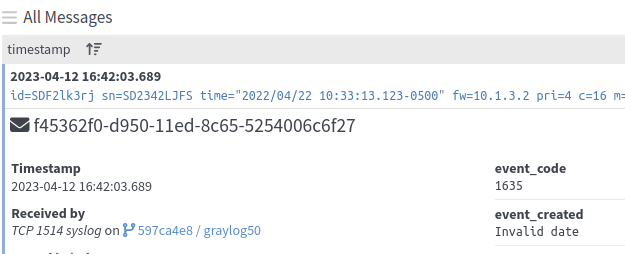
The Message View widget will sometimes display "Invalid date" even though the date field has been indexed successfully - see the lower right of the image below, with the field `event_created`:
---
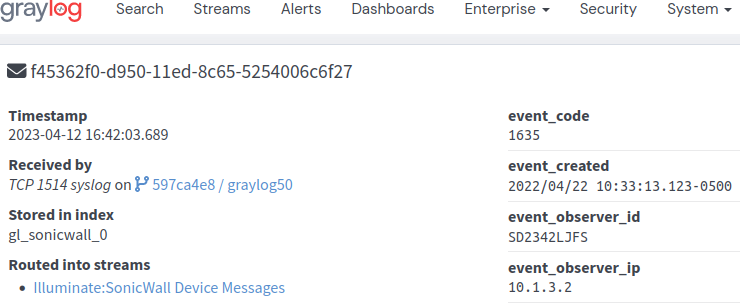
The field can be used for search and aggregations. The value field does display properly when opening the message in a new tab:
## Expected Behavior
The date value of the message should be displayed.
## Current Behavior
The message view replaces the value with 'Invalid date'
## Possible Solution
The message view should recognize more formats and/or If it cannot be parsed in the message view it should show the original value.
## Steps to Reproduce (for bugs)
1. Install Illuminate and activate the Sonicwall Illuminate pack
2. Replay the following message: `'id=SDF2lk3rj sn=SD2342LJFS time="2022/04/22 10:33:13.123-0500" fw=10.1.3.2 pri=4 c=16 m=1635 msg="sample placeholder value"`
3. Expand the message in the message view window and review the `event_created` field
## Context
This may lead to some confusion about the underlying data in the affected fields.
## Your Environment
* Graylog Version: 5.0.6
* Java Version: 17.0.6
* Elasticsearch Version: Opensearch 1.3.6
* MongoDB Version: 5.0.14
* Operating System: Ubuntu 20.04.5 LTS
* Browser version: Firefox 111.0.1 64-bit
Contributor guide
Assessment
This issue has not been assessed yet.