GoogleChrome / GoogleChrome/lighthouse
<select> elements with no label not picked up as an error
- Dominant language
- JavaScript
- Stars
- 30.8k
- Forks
- 9.8k
- Avg merge
- 1d 14h
- Merged PRs (30d)
- 20
Description
Consider the following minimal HTML page:
```html
Bad form
```
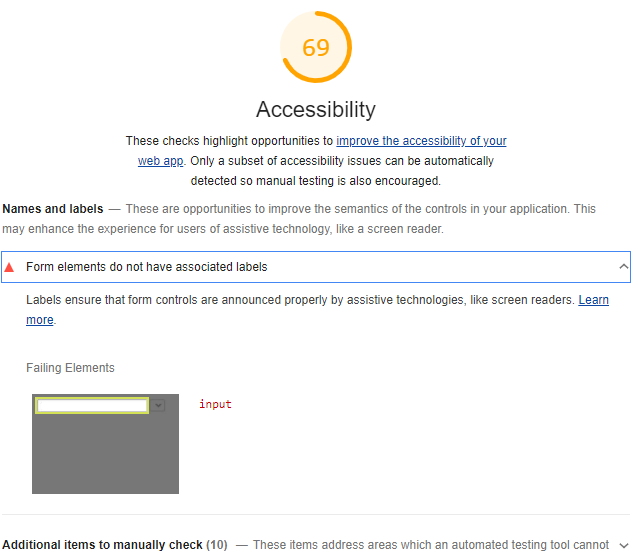
Neither the `input` nor the `select` have a label of any kind. However, Lighthouse Accessibility only picks up the `input`:
If I run the Axe extension over the page directly, it picks up two _different_ errors, "Form elements must have labels" and "Select element must have an accessible name":
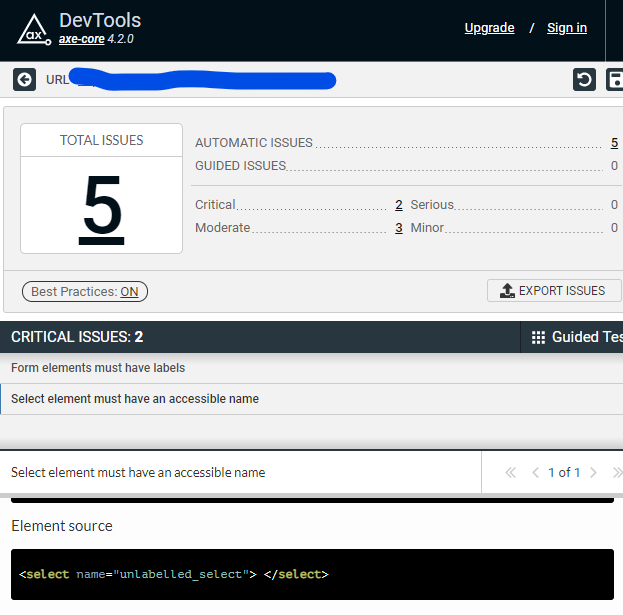
but Lighthouse is only reporting the first of these. It should report both.
Contributor guide
Research direction
Start by running Lighthouse Accessibility against the minimal HTML reproduction and compare its findings with the two errors reported by the Axe extension. Trace the accessibility audit responsible for form labels, then confirm done when the unlabeled input and select are both reported as expected.
Written by the indexing model from the issue text.
Assessment
- Tech stack
- javascript
- Domain
- accessibility
- Issue type
- Bug
- Difficulty
- 3/5
- Estimated time
- 1-2 days
- Activity status
- Stale
- Clarity
- Mostly clear
- Newbie friendliness
- 35/100