GenericMappingTools / GenericMappingTools/gmt
Problem controlling frame annotation in subplot
- Dominant language
- C
- Stars
- 979
- Forks
- 414
- Avg merge
- 17h 26m
- Merged PRs (30d)
- 54
Description
**Description of the problem**
I am using the inside MAP_FRAME_TYPE and would like change the frame annotation between subplots with the first subplot having annotated ticks and the following two subplots with just the tick marks. If I specify the -B option at the subplot begin line, then this seems to override the individual -B commands in the subplots.
Furthermore, the ticks and annotations are behind the grd file (and only visible because it is transparent - I think), how can I bring them to the front? I don't want to use annotations outside the plot as it would create more white space between the subplot frames.
**Full script that generated the error**
link to data files used in the script:
https://drive.google.com/drive/folders/1SnAVMq4OleuOQMrr4jAg3BY4LcLZZbOF?usp=sharing
```
# PASTE CODE HERE
#!/bin/bash
cpt="roma0.cpt"
obs_file1="D118input.grd"
model_file1="D118_lmodel.grd"
residual_file1="D118_lresidual.grd"
fault="fault_1f_uniform_long.txt"
gmt begin insar_plot png
gmt set MAP_FRAME_TYPE inside
gmt subplot begin 3x3 -Fs3i -A
gmt subplot set
gmt grdimage $obs_file1 -R170/172/61.8/62.5 -C$cpt -t40
gmt plot $fault -W1p,black -BWeSn+t"Observed"
gmt subplot set
gmt grdimage $model_file1 -R170/172/61.8/62.5 -C$cpt -t40
gmt plot $fault -Bwesn+t"Modelled" -W1p,black
gmt subplot set
gmt grdimage $residual_file1 -R170/172/61.8/62.5 -C$cpt -t40
gmt plot $fault -Bwesn+t"Residual" -W1p,black
gmt subplot end
gmt end show
```
**Full error message**
```
# PASTE ERROR MESSAGE HERE
```
**Actual outcome**
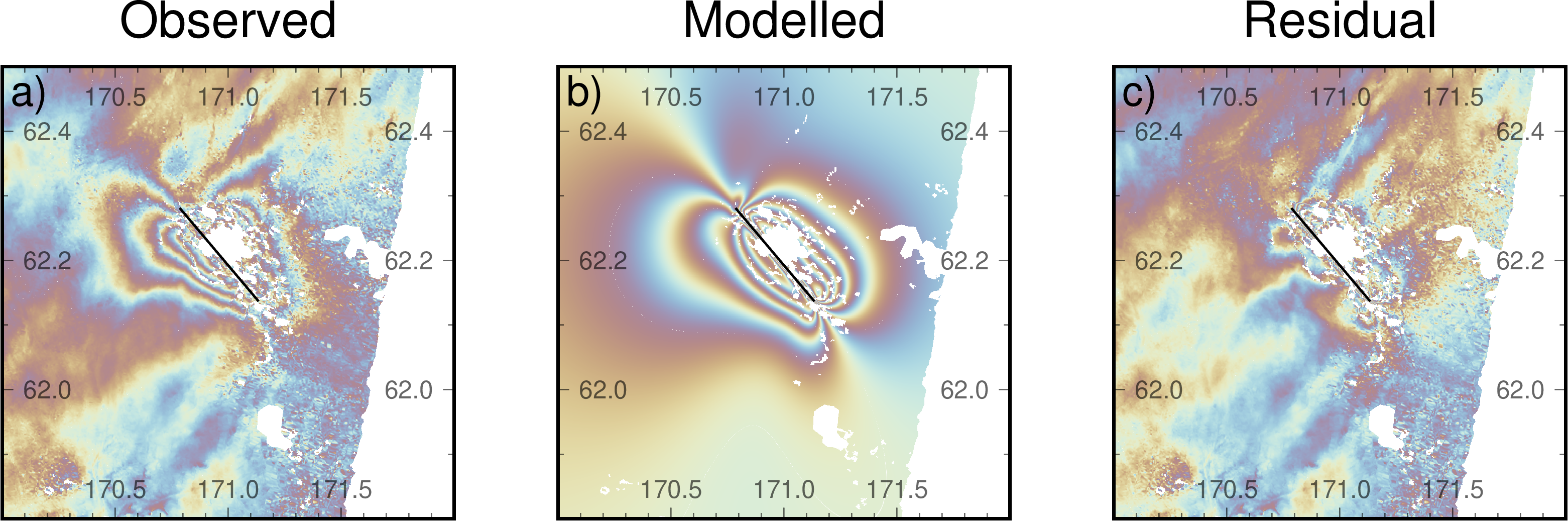
**Expected outcome**
I was hoping that only the first subplot would be annotated with the other subplots having only tickmarks. also the annotations should be completely opaque and at the 'top' layer
**System information**
* Operating system:macOS
* GMT version (6.1.1):
Contributor guide
Assessment
This issue has not been assessed yet.