GameServerManagers / GameServerManagers/LinuxGSM
[BUG] [Don't Starve Together] Cannot seem to override Cluster_1 default folder name
- Dominant language
- Shell
- Stars
- 4.9k
- Forks
- 864
- PR merge metrics
- No merged PRs in 30d
Description
## Basic info
* **Distro:** Ubuntu 20.04
* **Game:** Don't Starve Together
* **Command:** N/A
* **LinuxGSM version:** v21.1.2
## Further Information
I have been attempting to follow [this LGSM guide](https://docs.linuxgsm.com/game-servers/dont-starve-together) for installing a Don't Starve Together server with multiple "servers" on a single cluster - a caves and overworld server. It mentions to configure the per-server `.cfg` files individually before running `./dstserver-x install`, which I did. However, no matter what I seem to do...
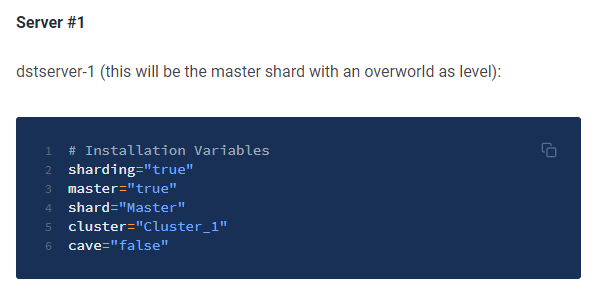
changing `Cluster_1` to any other value makes it still try to install to a Cluster_1 folder (in my case `/home/dstserver/.klei/DoNotStarveTogether/Cluster_1/`), and then when I try to run the server, it...tries to copy to my desired folder (named `Playground`)? But not everything is copied. cluster.ini, cluster_token.txt, and any worldgenoverrides.lua files are not copied correctly and I need to manually copy them to the "correct" folder for the server to work correctly.
I could not find any references to `Cluster_1` outside of the `_defaults.cfg` file, and I know that editing that file is futile. I am not sure if LGSM just expects all server owners to always name their folder Cluster_1 and what I'm trying to do is not intended.
Contributor guide
Assessment
This issue has not been assessed yet.