Permission denied in "other detected applications" section
- Dominant language
- Shell
- Stars
- 10.3k
- Forks
- 452
- PR merge metrics
- No merged PRs in 30d
Description
Hello!
I have encountered an issue when trying to get Adobe programs to run. I am using Creative Cloud on Windows 10 (the vm), and im on Linux pop-os 5.15.5.
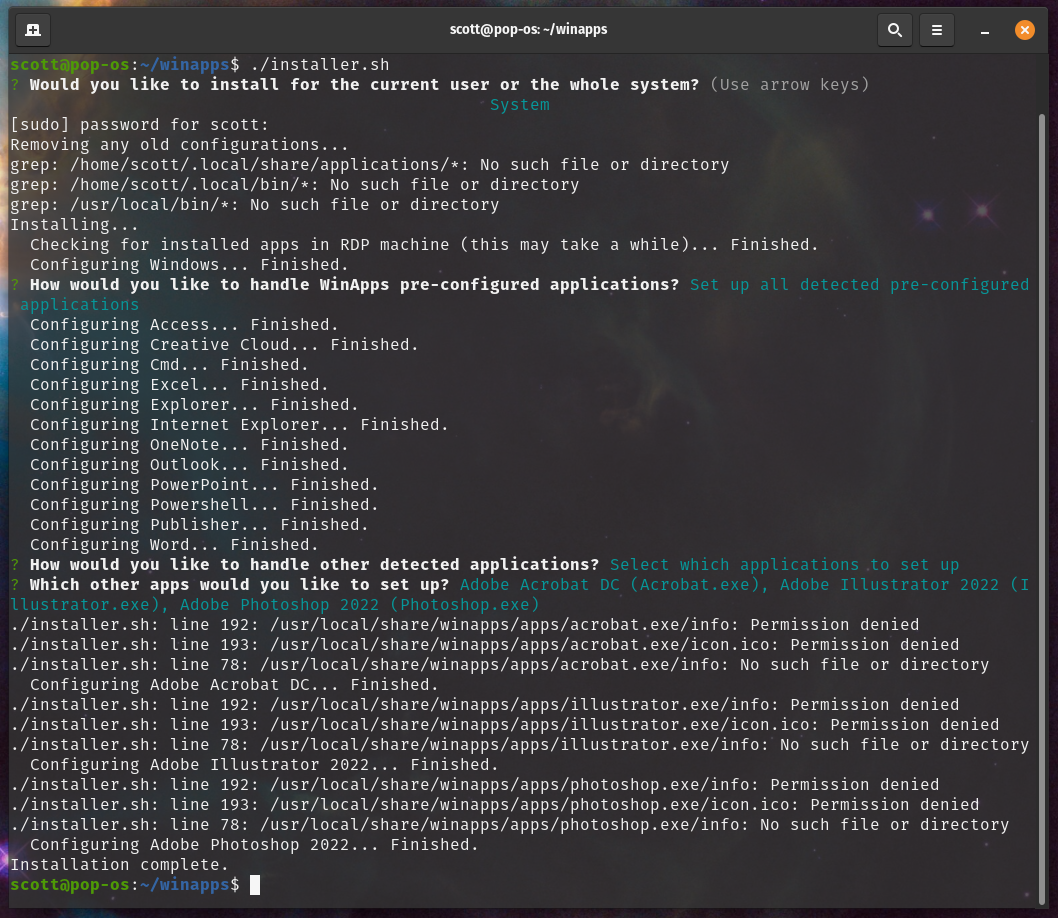
I noticed that none of the Adobe programs are recognized in the `pre-configured applications` section, which isn't a big deal because they're in the `other detected applications` section. That said, when I select *any* app from the "other detected applications" section, I am met with: `/usr/local/share/winapps/apps//info: Permission denied`.
I find this strange, because I am entering the correct sudo password at the beginning of the script?
One other note is that I am running this system-wide, not user based. If I run the install script and pick user, even the pre-configured applications get this "Permission denied" error.
I tried manually forcing permissions by chmod'ing the entire `/usr/local/share/winapps/apps` folder (temporarily), but no dice there.
Please let me know what I can do!
Screenshot:
Contributor guide
No contributing guide indexed for this repository
Assessment
This issue has not been assessed yet.