UI issues with admin templates - side bar loses highlight and field validation does not always work
- Dominant language
- JavaScript
- Stars
- 400
- Forks
- 89
- Avg merge
- 1d 20h
- Merged PRs (30d)
- 149
Description
### Current Behavior
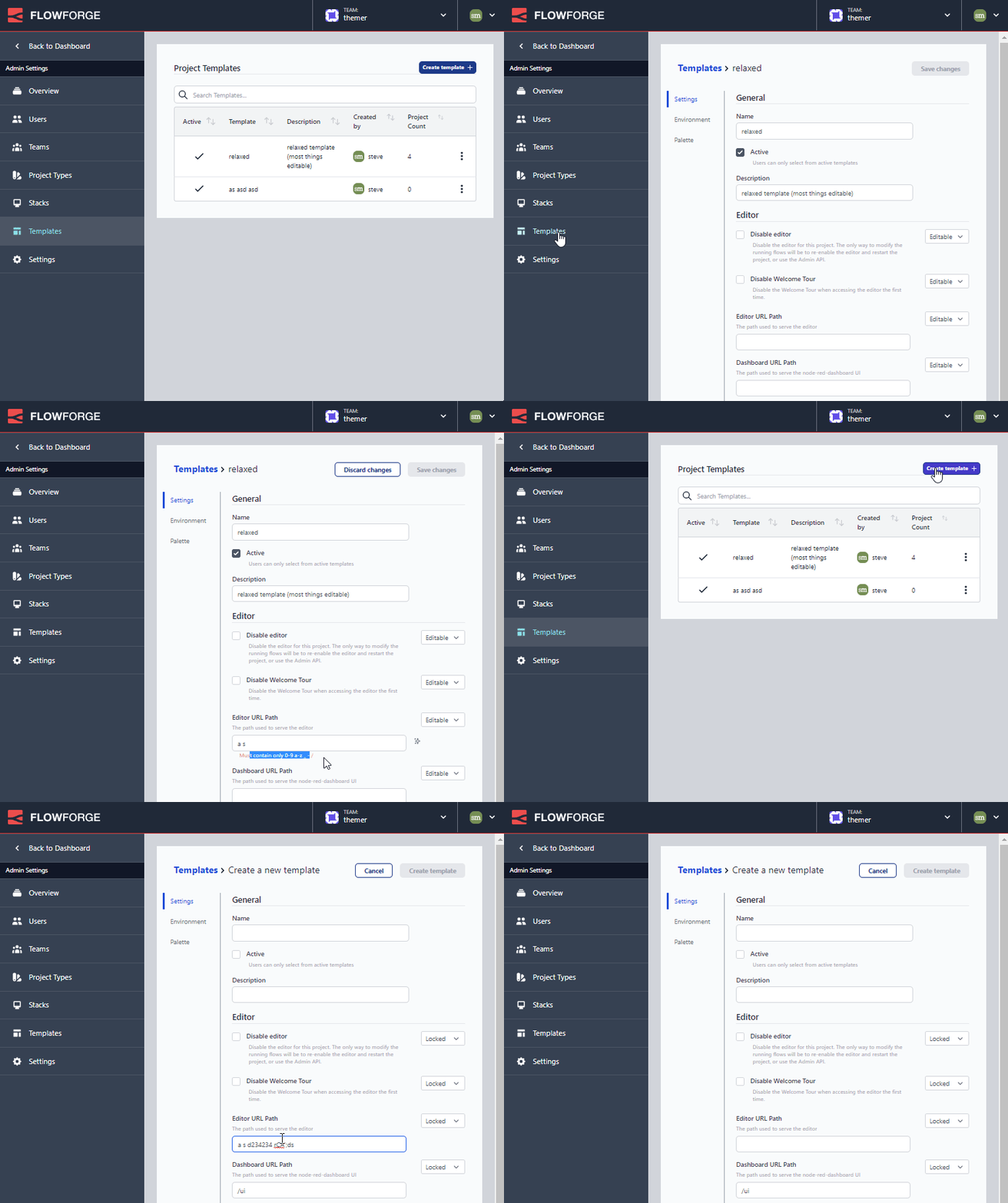
1. The side menu loses its highlight when a child component is viewed
2. field validation works in "Edit Template" mode but not in "New Template" mode
### Expected Behavior
Templates side menu should be shaded to indicate the area of the app the user is inside
Field validation should work for both New and Edit
### Steps To Reproduce
See GIF
### Environment
- FlowForge version: 0.10.0-git
- Platform/OS: Windows
- Browser: Chrome
Contributor guide
Research direction
Start by reproducing the two behaviors shown in the attached GIF in Chrome: navigate to a child view under Templates and try validation in both New Template and Edit Template. Done means the Templates menu remains highlighted in child views and field validation works in both modes.
Written by the indexing model from the issue text.
Assessment
- Tech stack
- javascript
- Domain
- frontend
- Issue type
- Bug
- Difficulty
- 3/5
- Estimated time
- 1-2 days
- Activity status
- Stale
- Clarity
- Mostly clear
- Newbie friendliness
- 35/100