FightPandemics / FightPandemics/FightPandemics-android
Create a Post
- Dominant language
- Kotlin
- Stars
- 12
- Forks
- 13
- PR merge metrics
- No merged PRs in 30d
Description
Create a Post UI: https://app.zeplin.io/project/5ec4729feee8e847b8d9f1d1?seid=5ee5378527da9fb6f6b24880
As a logged in user,
Given that I am on the feed and I tap on the ‘+’ sign,
Then I should be presented with a “Create a post” page with a user selection dropdown (by default the individual account will always be selected), Offer/Request toggle buttons (by default "Offer" will be selected), title field, description box, visibility and duration dropdown and “Add Tags” option.
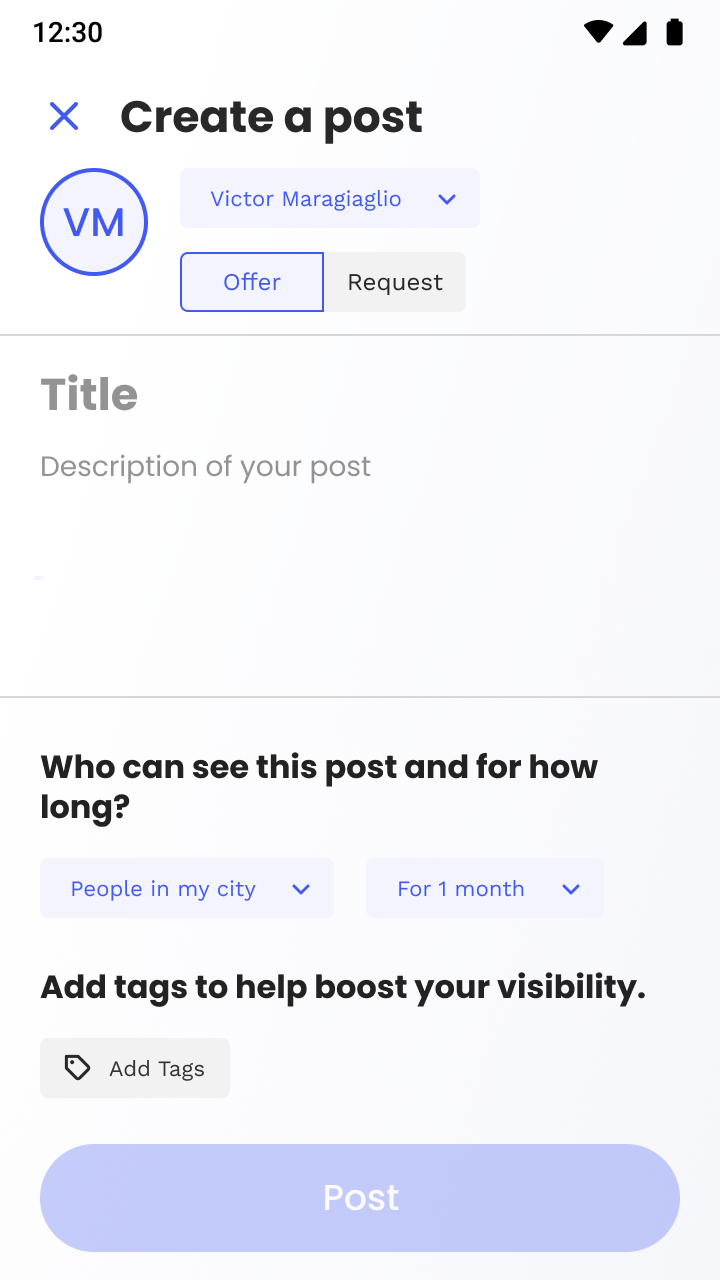
Given I am on the Create a Post page
When I tap on the Individual account name
Then I should see a pop up with options to switch between my individual account and the organizations along with an option to "add organizations" (By default my individual account will always be selected)
When I tap on the "Request" toggle button,
Then the "Request" button will be selected and highlighted while the "Offer" button will turn grey (By default the "Offer" toggle button will always be selected and highlighted)
When I tap on the “People in my city” dropdown
Then I should see a pop up with 4 options: “My Neighborhood”; “My City”; "My Country"; "Anyone" (By default "My City" will be selected)
When I tap on the “For 1 Month” dropdown menu
Then I should see a pop up with 4 options: “A day”; “A week”; “A month”; “Forever” (By default "A month" option will be selected)
When I tap on “Add Tags” option
Then I should see a pop up with various tag options to select (refer the UI)
**Acceptance Criteria:**
The "Post" button will be enabled only after adding all the information.
Contributor guide
Assessment
This issue has not been assessed yet.