Esri / Esri/field-maps-scripts
Virtual environment issue
- Dominant language
- Jupyter Notebook
- Stars
- 70
- Forks
- 22
- PR merge metrics
- No merged PRs in 30d
Description
Running `conda env create --file environment.yml` to create the virtual environment completes successfully ([link to full terminal output](https://pastebin.com/Up3VcAm2)), however when trying to run `proswap field-maps-scripts` I get the following error:
`proswap: C:\Program Files\ArcGIS\Pro\bin\Python\envs\field-maps-scripts environment doesn't appear to contain ArcGIS Pro`
In ArcGIS Pro when I go to Package Manager > Environment Manager I get the following error:
Broken Environment. Cannot be activated.
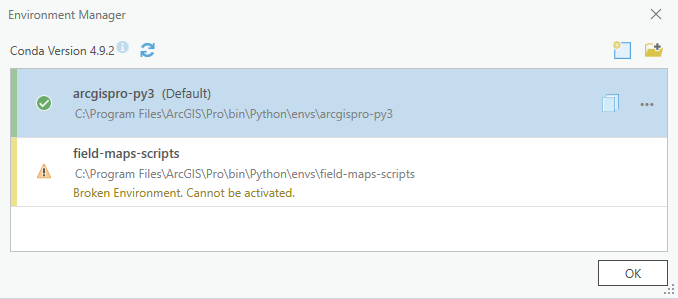
Additionally when activating the environment in the Python Command prompt I also get this message:
```
(arcgispro-py3) C:\Program Files\ArcGIS\Pro\bin\Python\envs\arcgispro-py3>activate field-maps-scripts
Current directory is another environment, changing directory to active environment.
(field-maps-scripts) C:\Program Files\ArcGIS\Pro\bin\Python\envs\field-maps-scripts\etc\conda\activate.d>rem proj-data is installed because its license was copied over
```
Is there anything I'm missing? Any help will be appreciated.
**To Reproduce**
Steps to reproduce the behavior:
1. Install ArcGIS Pro 3.0
2. Run `conda env create --file environment.yml` to create the virtual environment with the correct dependencies
3. Run `activate field-maps-scripts` to activate the environment
4. Run `proswap field-maps-scripts` to activate the environment
5. See error
6. Open ArcGIS Pro, go to Package Manager > Environment Manager
7. See error
**Expected behavior**
A working virtual environment which can be activated in ArcGIS Pro.
Contributor guide
No contributing guide indexed for this repository
Assessment
This issue has not been assessed yet.