EsotericSoftware / EsotericSoftware/spine-editor
[request] please make it possible to in- and/or exclude slots from ghosting
- Dominant language
- No language data
- Stars
- 33
- Forks
- 2
- PR merge metrics
- No merged PRs in 30d
Description
Creating animations where animated parts are in front of bigger static background(s) (or other moving objects being 'in the way') the ghosting silhouettes don't show the animated parts, as it's blocked by the bigger background(s) (or other animated parts). We can make sure we do see the animated parts by temporarly turning off the background slot(s) (or other animated parts), but we don't want that as it's part of the scene and lots of time we can't turn it off as it's needed to match positions with.
It's pretty tedius to constantly needing to turn backgrounds on and off like, especially because it's not a single click;
- we need to go to setup mode, because we have auto keyframes active and don't want it to be keyframed
- we need to find (and open) the 'background' slot(s)
- we can than turn off the background(s)s visibility
- we need to go back to animate mode to continue animating
Just look at this and try to see ghosting on the balls... it's impossible to see ghosting as the whole image is red (or another color) now because the background is part of the ghosting, masking everything else:
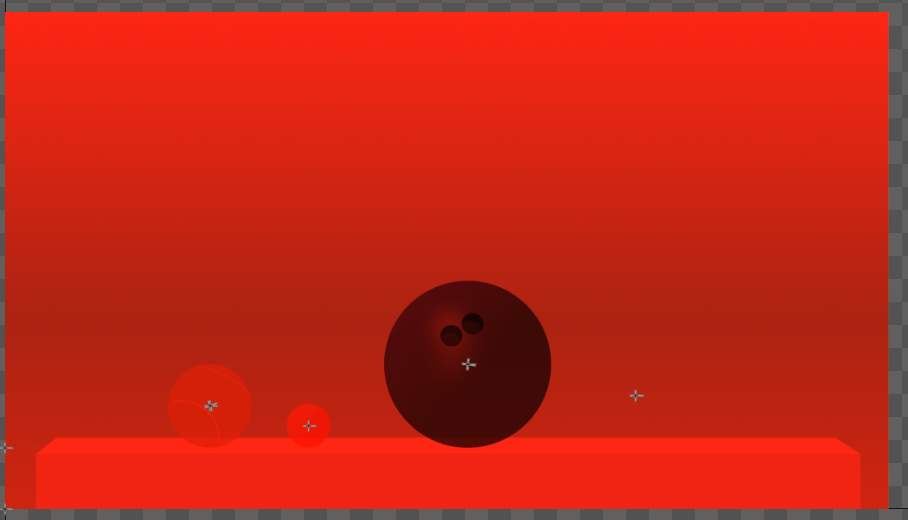
I think a great solution to this would be to be able to add slots to a list inside the ghosting panel to include these in the ghosting (all other slots then won't be ghosted). I mean a list like adding bones to the weights panel. Or otherwise have the other way around; adding slots to a list in the ghosting panel to exclude them from ghosting. Or perhaps even both methods together; an INCLUDE and an EXCLUDE list, so we can exclude if that works fast or include if that works faster for our scene.
Contributor guide
No contributing guide indexed for this repository
Assessment
This issue has not been assessed yet.