[Bug Report] fixed table Safari incompatible
- Dominant language
- Vue
- Stars
- 54k
- Forks
- 14.4k
- PR merge metrics
- No merged PRs in 30d
Description
### Element UI version
2.13.2
### OS/Browsers version
macOS Monterey 12.3 / Safari浏览器 15.4 (17613.1.17.1.6)
### Vue version
2.7.14
### Reproduction Link
https://codepen.io/anyhow-lee/pen/wvYdLpZ
### Steps to reproduce
1.Set the first column to fixed and each column to width 【
设置第一列 fixed,且每一列均设置width(无 min-width)】
2. in `src/styles/index.scss` set `.el-table .cell ` css style
【在 `src/styles/index.scss` 中对 `.el-table .cell ` 写多行省略css】
### What is Expected?
In Safari, the fixed column and the slideable row should be aligned without misalignment, and the first fixed column displays all data completely
在Safari浏览器中,固定列 与 可滑动每一行应对齐,不出现错位,且第一列固定列完整显示所有数据
### What is actually happening?
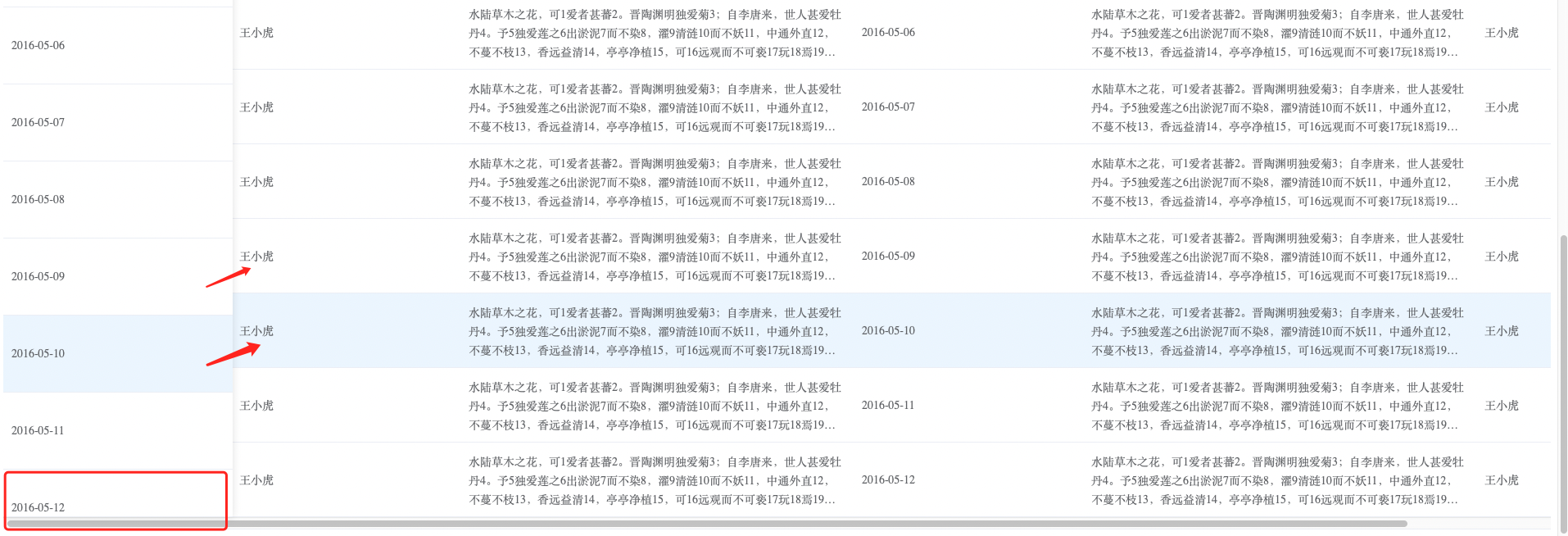
In Safari, rows are misaligned and the data in the first column appears incomplete
在Safari浏览器中,出现行错位,且第一列数据显示不完全
Contributor guide
No contributing guide indexed for this repository
Assessment
This issue has not been assessed yet.