[Bug Report] Can not select the time point when I use the DateTimePicker with datetimerange
- Dominant language
- Vue
- Stars
- 54k
- Forks
- 14.4k
- PR merge metrics
- No merged PRs in 30d
Description
### Element UI version
2.15.1
### OS/Browsers version
windows 10 / chrome 89.0.4389.90
### Vue version
2.6.11
### Reproduction Link
https://codepen.io/pen/?&prefill_data_id=5e1082a0-7291-44b5-86ee-36184eee75a3
### Steps to reproduce
官网的组件就能复现
1、选择同一天
2、点击左侧时分秒的输入框,以输入的方式改成12:00:00,此时右侧时分秒的输入框也会同步为12:00:00
3、左侧时分秒的输入框以输入的方式改为11:00:00
4、此时点击右侧时分秒的输入框,12:00:00前面的时间点无法选择
1、Select the same day
2、Input 12:00:00 on the left panel(Input, not select), the time of right panel is changed to be 12:00:00
3、Now, Input 11:00:00 on the left panel(Input, not select).
4、at this time, we can not select a time point before 12:00:00.
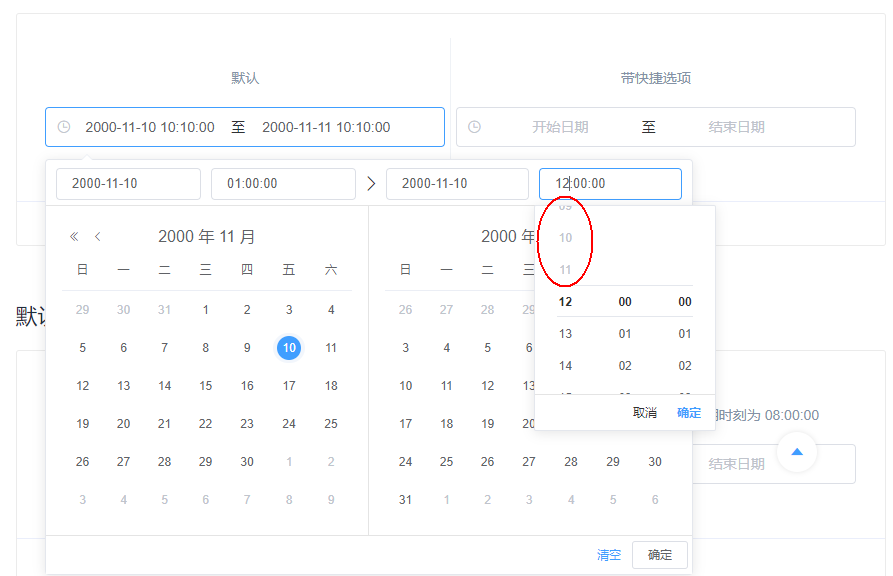
### What is Expected?
The time can be selected.
### What is actually happening?
The time can not be selected.
Contributor guide
No contributing guide indexed for this repository
Assessment
This issue has not been assessed yet.