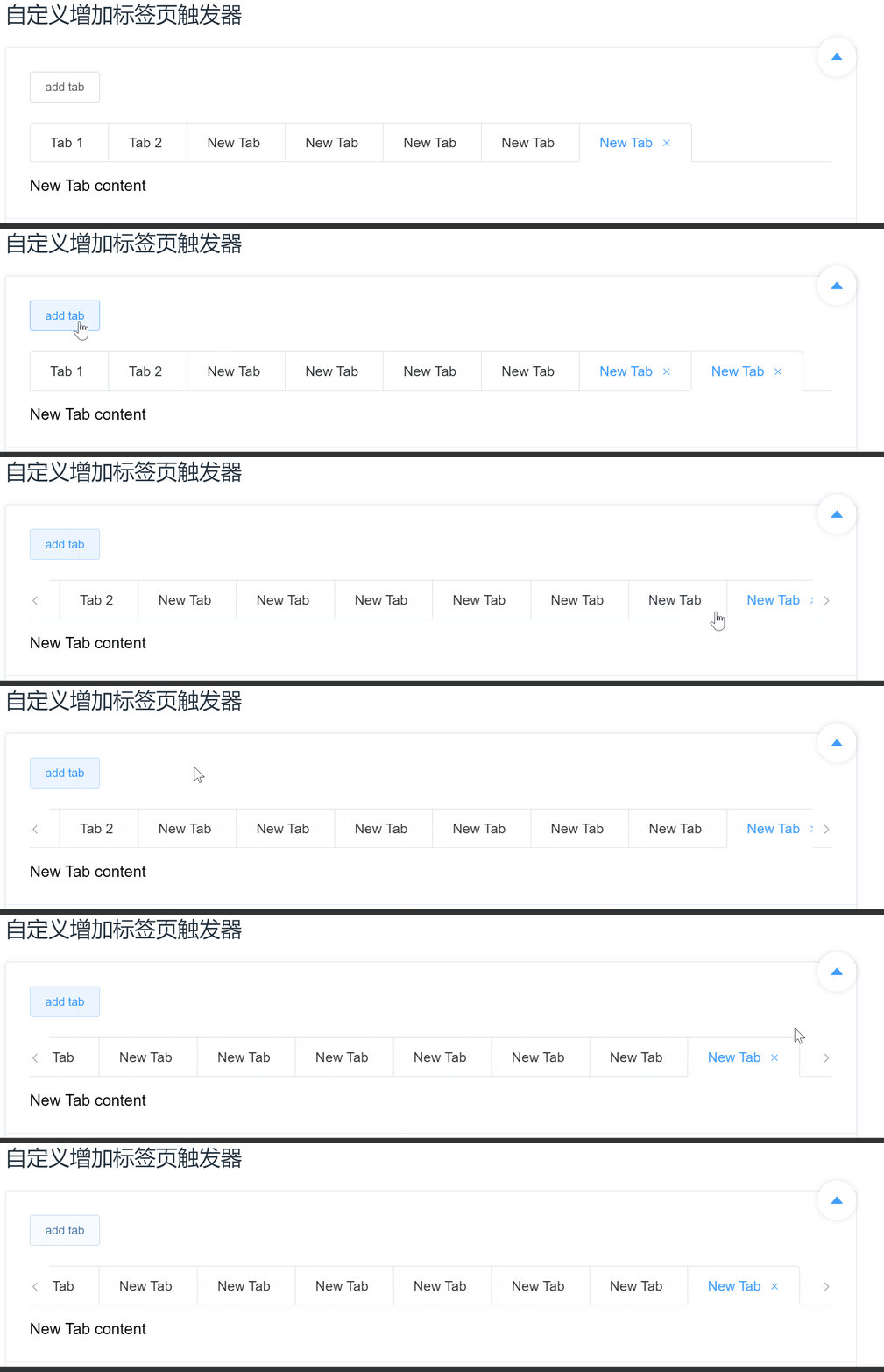
The left and right arrows in the [bug report] tabs component are not in the correct style. The newly added tabs are not all displayed when they just exceed the window.
- Dominant language
- Vue
- Stars
- 54k
- Forks
- 14.4k
- PR merge metrics
- No merged PRs in 30d
Description
### Element UI version
2.13.2
### OS/Browsers version
win10 Ewin10 Edge85
### Vue version
2.6.11
### Reproduction Link
https://codepen.io/pen/?&editable=true&prefill_data_id=536a1270-9047-0138-8fb7-02420aff0011&referer=https%3A%2F%2Felement.eleme.cn%2F
### Steps to reproduce
使用的是官网文档示例: [自定义增加标签页触发器](https://element.eleme.cn/#/zh-CN/component/tabs#zi-ding-yi-zeng-jia-biao-qian-ye-hong-fa-qi)。
1. 点击添加 tab,直到刚超出窗口。刚刚第一次超出窗口时,没显示完全。
之后使超出窗口就会显示左右箭头。
2. 打开开发者工具。
3. 点击左箭头使 tab 至最左边,但是当前左箭头(el-icon-arrow-left)没有 `is-disabled` 样式。
4. 然后点击向右箭头,此时左边箭头出现了 `is-disabled` 样式。

### What is Expected?
1. 新添加的 tab 应该完全显示.
2. tab 在最左侧时,左箭头应该有 `is-disabled` 样式
### What is actually happening?
1. 刚超出窗口的没显示完全
2. tab 在最左侧时,左箭头没有 `is-disabled` 样式,点击右箭头时,左侧才出现,但是此时不是最左边。
Contributor guide
No contributing guide indexed for this repository
Assessment
This issue has not been assessed yet.