ElemeFE / ElemeFE/element-react
[Bug Report] Select with default value in dialog will have wrong style.
- Dominant language
- JavaScript
- Stars
- 2.8k
- Forks
- 435
- PR merge metrics
- No merged PRs in 30d
Description
### Description
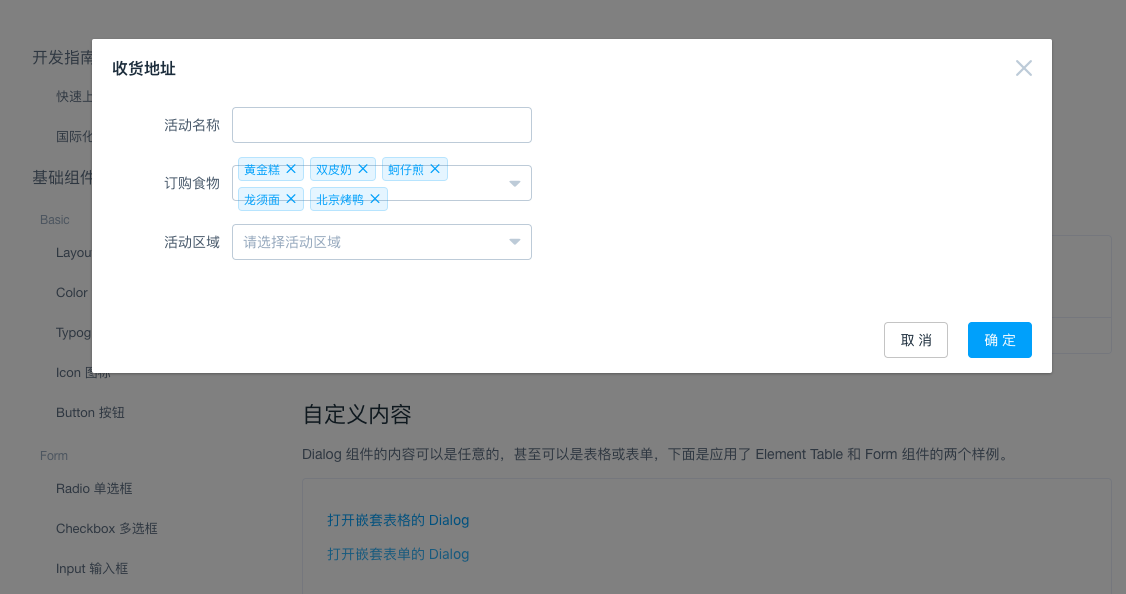
有默认值的Multiple Select组件在Dialog中,一打开就会造成样式错误。Select组件中的Tags会撑爆Input输入框。
Multiple Select component with default value which is in Dialog component will have wrong style. If you open the dialog, you will see the tags overflow the select input.
### Reproduce Steps
```javascript
constructor(props) {
super(props);
this.state = {
dialogVisible3: false,
form: {
name: '',
region: '',
food: [
'选项1',
'选项2',
'选项3',
'选项4',
'选项5',
],
},
options: [{
value: '选项1',
label: '黄金糕'
}, {
value: '选项2',
label: '双皮奶'
}, {
value: '选项3',
label: '蚵仔煎'
}, {
value: '选项4',
label: '龙须面'
}, {
value: '选项5',
label: '北京烤鸭'
}]
};
}
render() {
return (
this.setState({ dialogVisible3: true }) } type="text">打开嵌套表单的 Dialog
this.setState({ dialogVisible3: false }) }
>
{this.state.options.map(el => (
))}
this.setState({ dialogVisible3: false }) }>取 消
this.setState({ dialogVisible3: false }) }>确 定
)
}
```
### Error Trace (if possible)
None.
### Solution
由于Dialog在关闭着的时候,Dialog组件是display: none的,在render Dialog中Select(带默认值,超过一行的tags)时,[实际高度](https://github.com/ElemeFE/element-react/blob/master/src/select/Select.jsx#L556)为0,所以计算高度是36px。此时再显示弹框,并不会造成组件重渲染。给组件加上key={isShow}也没有用。
因此给Dialog加入onOpen事件。只有在触发onOpen事件,子组件在可以有实际高度之后,再去去渲染children。此时children就可以正常渲染。
libs/transition/index.js的[此处](https://github.com/ElemeFE/element-react/blob/master/libs/transition/index.js#L176)执行onEnter(),给子组件渲染并不能有高度。为此加入startEnter这个hook。
同时也给dialog加上对外的event。(需要更新index.d.ts,近几天会补上。)
### Additional Information
已补上中英文文档。
Contributor guide
Assessment
This issue has not been assessed yet.