DynamoRIO / DynamoRIO/drmemory
Dr. Memory internal crash
- Dominant language
- C
- Stars
- 2.7k
- Forks
- 290
- PR merge metrics
- No merged PRs in 30d
Description
**Describe the bug**
While trying to detect memory issues in my program, DrMemory crashed and asked me to report this:
~~Dr.M~~ Fetching 1 symbol files...
~~Dr.M~~ [1/1] Fetching symbols for C:\WINDOWS\System32\msvcrt.dll
WARNING: drfront_sym_exit failed 6
~~Dr.M~~ Fetched 0 symbol files successfully
~~Dr.M~~ WARNING: application exited with abnormal code 0xffffffff
**To Reproduce**
Steps to reproduce the behavior:
Happens every time I start my (private, sorry) application.
Command line:
drmemory -no_check_gdi -- ivt
Please also answer these questions drawn from https://github.com/DynamoRIO/drmemory/wiki/Debugging#narrowing-down-the-source-of-the-problem :
- Does the problem go away when running in light mode (pass `-light` to Dr. Memory)?
No: It crashes much faster, the first call first shows a bunch of uninitialized reads.
- Does the problem go away when running with the options `-leaks_only -no_count_leaks -no_track_allocs`?
No also crashes,
- Does the problem go away when running under plain DynamoRIO? Do this by running `dynamorio/bin32/drrun -- ` or `dynamorio/bin64/drrun -- ` depending on the bitwidth of your applicaiton. (Ignore warnings about "incomplete installation".)
It complains about log-dir it cannot make, my binary seems to run at normal speed, no issues reported, no crash.
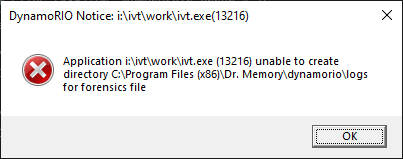
- What happens with the debug version of Dr. Memory and of its underlying engine DynamoRIO? Try this by passing `-debug -dr_debug -pause_at_assert`. Are any messages reported?
It pops up with an ASSERT FAILURE:
ASSERT FAILURE (thread 3544): D:\drmemory_package\drmemory\fastpath_x86.c:1004: mi->memsz <= 4 (load2x of 8-byte memop not supported)
**Expected behavior**
A clear and concise description of what you expected to happen.
I had hoped to detect memory issues in MY application, not yours :-)
**Screenshots or Pasted Text**
If applicable, add screenshots to help explain your problem. For text, please cut and paste the text here, delimited by lines consisting of three backtics to render it verbatim, like this:
```

paste output here

```
**Versions**
- What version of Dr. Memory are you using?
DrMemory-Windows-2.3.0-1.msi
- Does the latest build from
https://github.com/DynamoRIO/drmemory/wiki/Latest-Build solve the problem?
I upgraded to this latest version to see if it could find new problems...
- What operating system version are you running on? ("Windows 10" is *not* sufficient: give the release number.)
Microsoft Windows [Version 10.0.19041.388]
- Is your application 32-bit or 64-bit?
64
**Additional context**
Add any other context about the problem here.
Contributor guide
Assessment
This issue has not been assessed yet.