DynamoRIO / DynamoRIO/drmemory
Windows 10 crash when using gcc -o for files
- Dominant language
- C
- Stars
- 2.7k
- Forks
- 290
- PR merge metrics
- No merged PRs in 30d
Description
**Link to files including error details, dump file, and source code:**
This also includes a detailed word document with screenshots, compilation instructions with GCC (note this is MinGW's gcc for windows).
https://drive.google.com/open?id=1emwX9_UMWrvpOzW0Yrk5P1Ptoq5XDkcU
**NOTE this crash does not occur if I run the exe using plain DynamoRIO. I did this following the instructions on the debugging section of the wiki. **
When running the gcc -g memory_leak_example.c -o spies exe with plain DynamoRIO (32 bit) the program starts and does not crash.
**What steps will reproduce the problem?**
1. compile the attached source code with gcc -g memory_leak_example.c -o spies
2. drag/drop the exe or run drmemory spies.exe in command line
3. now compile the code with gcc -g memory_leak_example.
4. drag/drop the exe or run drmemory a.exe in the command line (a.exe is the default gcc output when no -o option is specified, at least on my machine)
**What is the expected output? What do you see instead?**
I expected the program to run with drmemory regardless of using the -o option. Instead I see the following error:
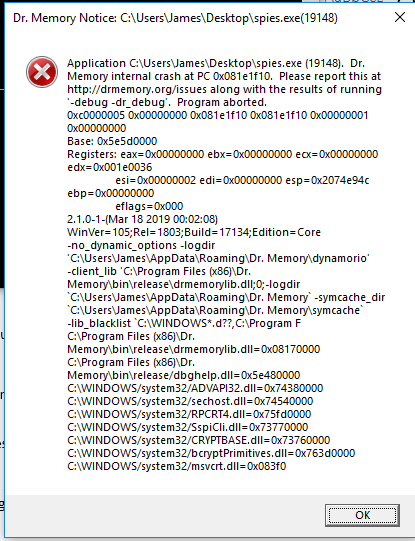
**What version of the product are you using? On what operating system?**
Using 2.1.0.1 on Windows 10 (Build version 1703 OS Build 17134.765)
**Does the problem go away when running in light mode (pass "-light" to Dr.
Memory)? What about when running with the options "-leaks_only
-no_count_leaks -no_track_allocs"?**
No
**Does the problem go away when using the most recent build from
https://github.com/DynamoRIO/drmemory/wiki/Latest-Build?**
No
**Try the debug version of Dr. Memory and of its underlying engine DynamoRIO
by passing "-debug -dr_debug -pause_at_assert" to drmemory.exe. Are any
messages reported?**
Yes but I believe it is the same error messages that happen on a crash
**Please provide any additional information below. Please also see the
"Narrowing Down the Source of the Problem" section
of https://github.com/DynamoRIO/drmemory/wiki/Debugging.**
I appreciate your time and thanks for the work you guys do!
Contributor guide
Assessment
This issue has not been assessed yet.