Show swap usage in the monitoring memory card
Nobody has claimed this yet.
- Dominant language
- TypeScript
- Stars
- 37.4k
- Forks
- 3k
- Avg merge
- 1d 3h
- Merged PRs (30d)
- 73
Description
What problem will this feature address?
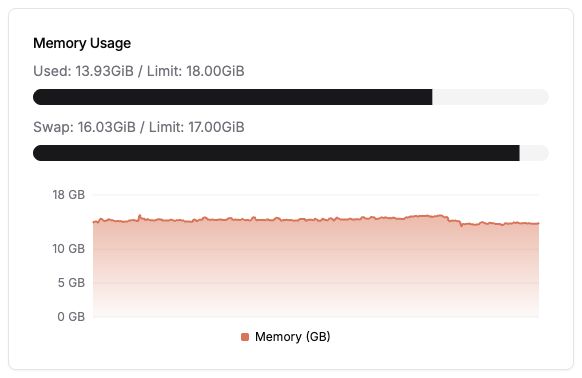
The Monitoring page shows RAM usage, but it does not show swap usage when the host has swap available. This can hide memory pressure from users, especially on systems where services keep running because the OS is actively using swap.
Describe the solution you'd like
Show swap usage in the Memory Usage card when swap data is available. The card should keep the existing RAM usage display and add a second, separate swap usage row only when the reported swap total is greater than zero.
A PR is already open for this implementation: #4574
Describe alternatives you've considered
Users can check swap manually with host-level tools such as free, swapon, or platform-specific commands, but that requires leaving the Dokploy UI and makes memory pressure less visible during routine monitoring.
Additional context
The proposed PR stores swap usage alongside the existing memory stats without changing existing RAM fields, keeps older monitoring entries compatible, includes a macOS fallback for local development, and includes tests plus a screenshot.
Will you send a PR to implement it?
Yes
Contributor guide
First steps
- Read the whole issue, then the project's contributing guide.
- Comment on the issue to say you are picking it up — it saves two people doing the same work.
- Fork the repository and make your change on a branch.
- Open a pull request that references the issue number.
Research direction
Review PR #4574 and the existing Monitoring page Memory Usage card to understand the proposed implementation. Done means preserving the current RAM display and showing a separate swap row only when reported swap total is greater than zero, with compatibility for older monitoring entries.
Written by the indexing model from the issue text.
Assessment
- Tech stack
- typescript
- Domain
- observability
- Issue type
- Feature
- Difficulty
- 3/5
- Estimated time
- 1-2 days
- Activity status
- Stale
- Clarity
- Clearly specified
- Newbie friendliness
- 20/100