DependencyTrack / DependencyTrack/frontend
Tag filtered project page has no indicator it was filtered
- Dominant language
- Vue
- Stars
- 171
- Forks
- 250
- Avg merge
- 10h 56m
- Merged PRs (30d)
- 84
Description
### Current Behavior
When clicking on a tag in a project
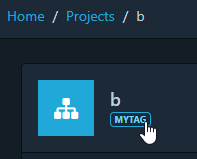
the user is redirected to a filtered project list page.
This is very useful. However I could find no UI element on this page that indicated that I was filtering for a tag or to undo the filter. This could be very confusing e.g. if you are sent a filtered link to the project list page and do not notice the additional query parameter in the URL.
### Proposed Behavior
I would have expected a visible indicator that the view has been filtered to a specific tag in the project list page. E.g. the tag could be shown in/near the search field. There should be a way to undo the filter. E.g. by clicking an some form of delete button on the indicator:

Having the ability to edit/add a tag filter directly on the project list page would be ideal.
### Checklist
- [X] I have read and understand the [contributing guidelines](https://github.com/DependencyTrack/dependency-track/blob/master/CONTRIBUTING.md#filing-issues)
- [X] I have checked the [existing issues](https://github.com/DependencyTrack/frontend/issues) for whether this enhancement was already requested
Contributor guide
No contributing guide indexed for this repository
Research direction
Start at the project list page reached after clicking a project tag and inspect how its filtered state is represented in the UI. Add a visible tag-filter indicator with a way to remove the filter, then verify that both direct filtered links and navigation from a tag make the state and reset action clear.
Written by the indexing model from the issue text.
Assessment
- Domain
- frontend
- Issue type
- Feature
- Difficulty
- 3/5
- Estimated time
- 1-2 days
- Activity status
- Stale
- Clarity
- Mostly clear
- Newbie friendliness
- 35/100