Add pagination in the scenario history screen
- Dominant language
- Java
- Stars
- 80
- Forks
- 17
- PR merge metrics
- No merged PRs in 30d
Description
# Add pagination in the scenario history screen
## Context
Currently, when display the history of a scenario, ALL matching executions are downloaded and shown at once :
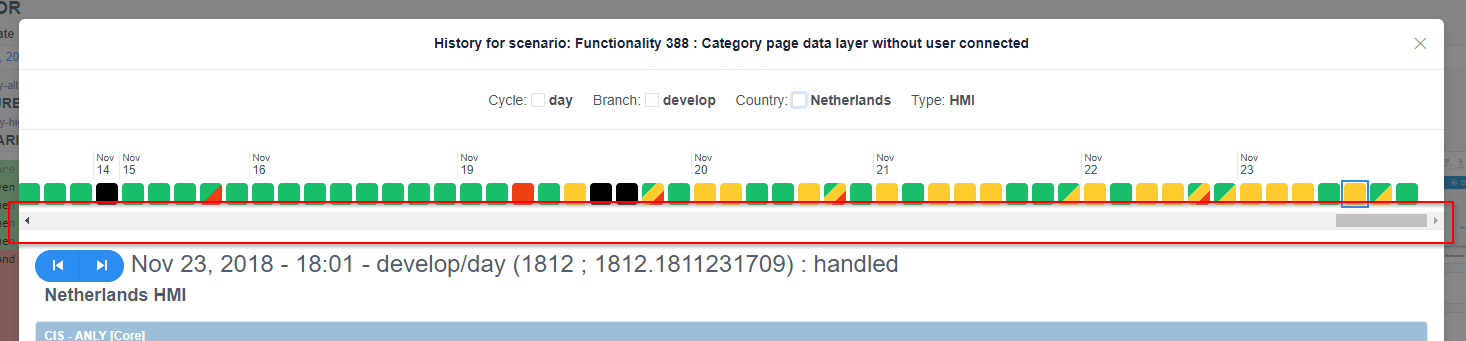
This behavior may introduce performance issues when the history grows.
## Expected
We only need the latest X days (perhaps one month) to already have a good overview. +
This is what should be loaded by default.
But sometimes, we could need to have the big picture by loading more: a pagination mechanism could be added.
We could load 30 days at a time, starting with the last 30 days, then the previous 30 days, etc.
The API should include two parameters: fromDate and toDate (containing a date in the format `YYYY-MM-DD`).
When going to the left of the history squares, a button `PREVIOUS 30 DAYS` could appear (if and only if there are more history points to load) to load the previous page:
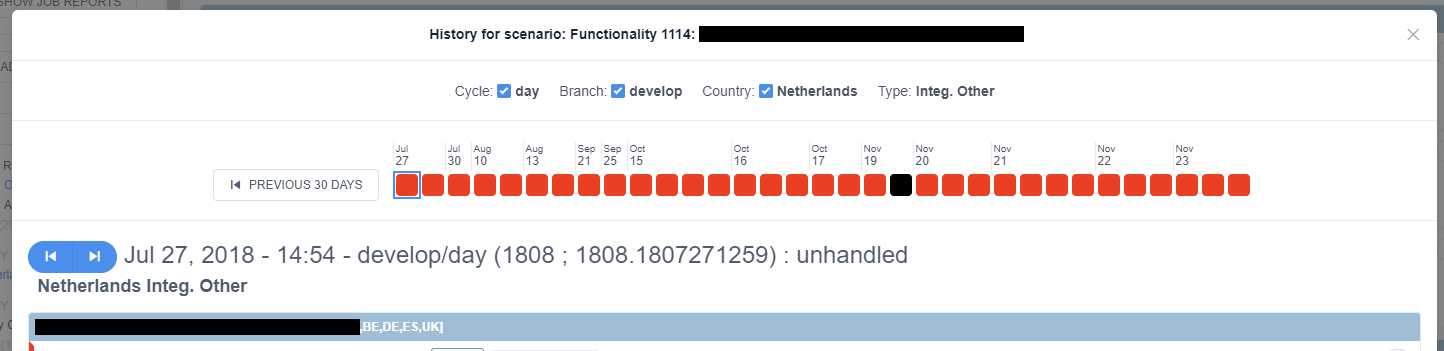
Likewise, when on the first date, the `PREVIOUS` blue icon-button should not be disable, and should trigger a new page load before selecting the real previous scenario. +
If no more history page is to be loaded, the `PREVIOUS` icon-button should remain gray/disabled, as of now.
Contributor guide
No contributing guide indexed for this repository
Research direction
No files or tests are named. Start by locating the scenario history screen and the API that downloads matching executions, then trace how dates and the previous-scenario control are handled. Done means the initial view loads the latest 30 days, older pages can be requested in 30-day ranges, and navigation stays disabled when no earlier history exists.
Written by the indexing model from the issue text.
Assessment
- Tech stack
- java
- Domain
- api, frontend
- Issue type
- Feature
- Difficulty
- 4/5
- Estimated time
- 3-5 days
- Activity status
- Stale
- Clarity
- Mostly clear
- Newbie friendliness
- 35/100