Add a button to check the changelog between 2 NRT executions
- Dominant language
- Java
- Stars
- 80
- Forks
- 17
- PR merge metrics
- No merged PRs in 30d
Description
# Add a button to check the changelog between 2 NRT executions
## Context
When fetching a new execution, store the commitId of the project's sources.
Then, when an execution result is displayed, a new button should allow to compare the source code using by this execution with the source code used by the previous execution of the same cycle.
## Expected
In the execution menu, two new actions should appear if the commit ID is present:
* `COPY COMMIT: theCommitId` to both show the commitID, and allow to copy it to clipboard when the action is clicked
* `COMPARE SOURCE CODE WITH PREVIOUS EXECUTION` (displayed only if there is a previous execution commitID available) to to to GitLab/GitHub and compare changes between current vs. previous commitID (the icon is `md-git-compare`)
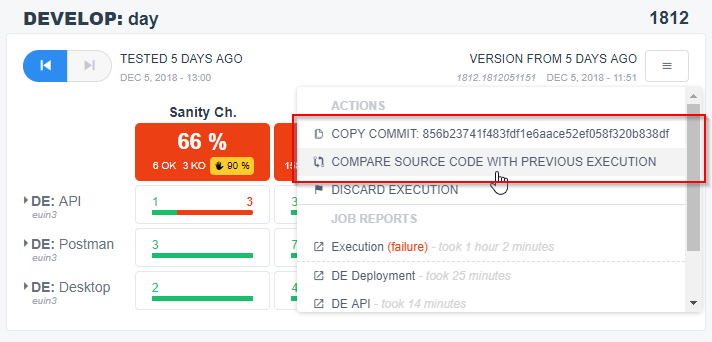
When clicking `COMPARE SOURCE CODE WITH PREVIOUS EXECUTION`, open a URL to the diff view of the Source repository (GitHub, GitLab, Bitbucket...).
*Note* : the compare URL should be configurable per project and the default format/example should be a GitHub URL : `https://github.com/company/project/compare/previousCommitId...currentCommitId`
Contributor guide
No contributing guide indexed for this repository
Research direction
Start at the new-execution fetch path and the execution-result menu, tracing where the project source repository and commit ID are available. Verify the two menu actions and configurable compare-URL behavior for executions in the same cycle; done means copying the current commit works and comparison opens only when both commit IDs exist.
Written by the indexing model from the issue text.
Assessment
- Tech stack
- git, github, java
- Domain
- testing
- Issue type
- Feature
- Difficulty
- 4/5
- Estimated time
- 3-5 days
- Activity status
- Stale
- Clarity
- Mostly clear
- Newbie friendliness
- 35/100