Let ARA take the ownership of cycle triggering
- Dominant language
- Java
- Stars
- 80
- Forks
- 17
- PR merge metrics
- No merged PRs in 30d
Description
# Let ARA take the ownership of cycle triggering
## Context
Actually ARA won't offer the possibility to schedule the cycle runs, it has to be done previously by the user (or CI/CD), and then sends the results to ARA to trigger an analysis.
## Expected
Allow to set-up a CRON to configure and launch each cycle by ARA.
ARA will be the component that will launch the tests.
ARA will request the continuous integration to launch a job with parameters at a given time.
This will have the following benefits:
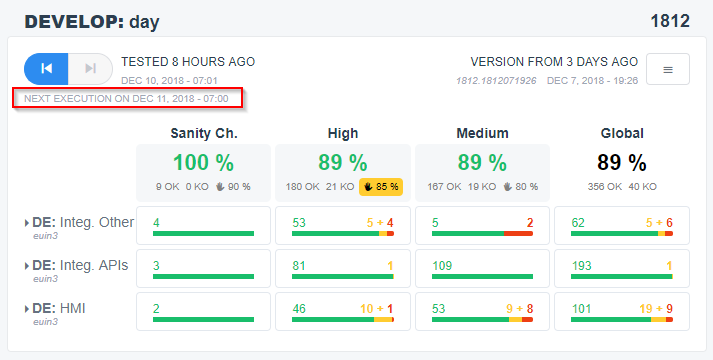
* This will enable ARA to display the next execution schedule for each cycle.
* No need to manually do operations to switch between cycles
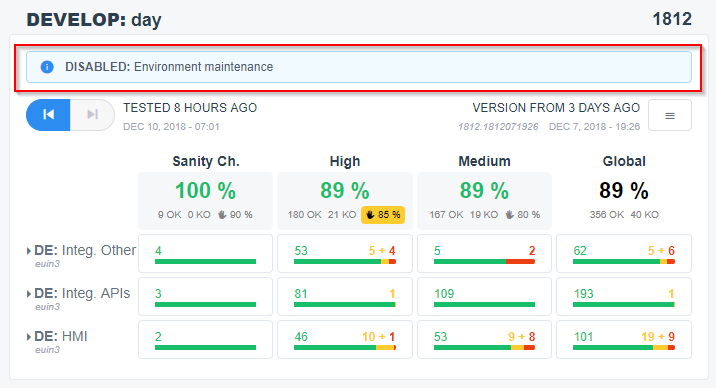
* And when disabling tests, users will need to enter a reason that can be displayed to all the team.
This should be controlled only by Project administrator (and this issue will depends on #19 ).
## Technical Details
Somewhere in the Manage Cycles screen (either a button a an editable field), there should be a way to configure launches:
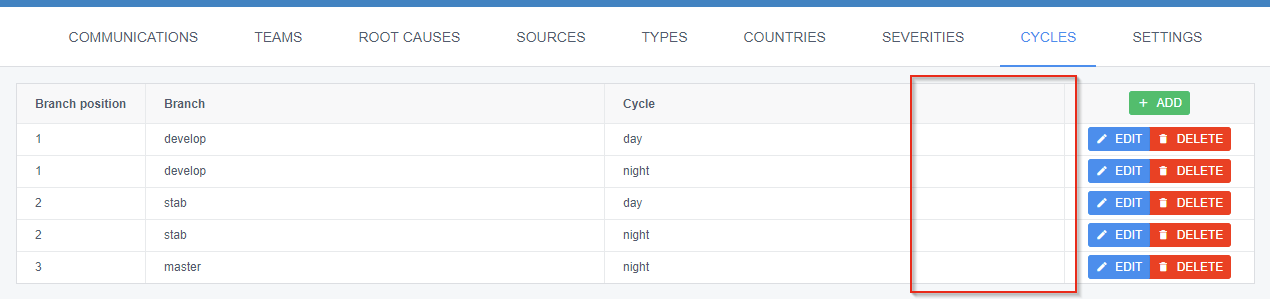
When editing fields, the equivalent of a `cycleInformation.json` + other metadata should be editable:
* `[ ] Enable this cycle` (checkbox to enable ARA to launch this cycle at regular intervals)
* `Disabling reason: [ Environment maintenance ]` (text field, enabled AND mandatory when `Enabled` is checked`, when re-enabling, the disabling reason should be cleared, to force users to type a new reason on each disabling, and not blindly reuse the previous one without checking it is the same reason)
* `Cron: [ 0 7,13,18 * * 1-5 ]` (text field, or a more graphical way to configure a CRON task)
* `[ ] Blocking validation` (checkbox to make the quality thresholds mandatory)
* `Quality thresholds: [ ... ]` (at the very least, a textarea to modify the JSON field... A more graphical way would be needed)
* `Runs` (at the very least, a textarea to modify the JSON field of which all runs... A more graphical way would be needed)
* `Launch HTTP URL: [ http://jenkins.company.com/project/cycle?BRANCH=branch ]` the URL to use to launch an execution, with placeholders
* `Launch HTTP headers: [ ... ]` the HTTP headers to use to launch an execution, with placeholders, to allow authentication
* `Launch HTTP body: [ ... ]` the body to use to launch an execution, in case some environment variables or launch parameters should be provided as JSON/XML/... bodies
The `Launch HTTP ...` options could be in settings, but this restricts to have the same parameters for all cycles of the project.
Or this could be a new configuration table, like SOURCES, and a combobox could be present in editing cycles (but do we need such complexity just to avoid a few duplications?).
On the main menu, if a cycle is enabled, the next execution date should be computed and displayed:
And if the cycle is disabled, the disabling reason should be displayed:
Contributor guide
No contributing guide indexed for this repository
Research direction
No files, tests, or entry points are named. Start by mapping the Manage Cycles screen, cycle configuration, project-admin permissions, and CI launch integration; done means enabled cycles launch on their CRON schedule, show the next execution or disabling reason, and support the specified launch metadata.
Written by the indexing model from the issue text.
Assessment
- Domain
- backend, devops, frontend
- Issue type
- Feature
- Difficulty
- 5/5
- Estimated time
- Over a week
- Activity status
- Stale
- Clarity
- Mostly clear
- Newbie friendliness
- 25/100