DataTables / DataTables/SearchBuilder
Search Builder dropdown column build is not checking for the "searchable": false condition in datatables
Open
Nobody has claimed this yet.
- Dominant language
- TypeScript
- Stars
- 23
- Forks
- 20
- PR merge metrics
- No merged PRs in 30d
Description
If you have a datatable column condition like this...
"columns": [
  { "data": "Name" },
  {
    "data": null,
    "sortable": false,
    "searchable": false,
    "render": function render(data, type, row, meta) {
                    var output = "<a class=\"action-view btn btn-xs btn-outline-secondary\" title=\"View\" href=\"/View/" + row.id + "\"><span class=\"bx bx-edit-alt\"></span></a>";
                    return output;
    }
}]
Search Builder column dropdown will still show the item
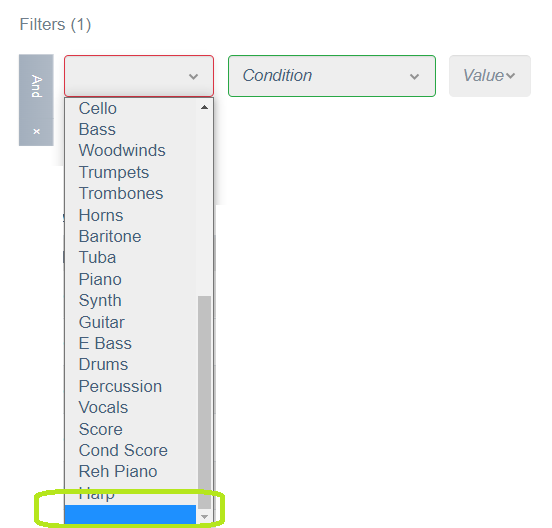
I looked at source code, and I could not find (yet) the spot where you are populating it
Contributor guide
No contributing guide indexed for this repository
First steps
- Read the whole issue, then the project's contributing guide.
- Comment on the issue to say you are picking it up — it saves two people doing the same work.
- Fork the repository and make your change on a branch.
- Open a pull request that references the issue number.
Research direction
Start by tracing how the Search Builder column dropdown is populated and where DataTables column options are inspected. Reproduce the example with a column marked "searchable": false, then identify the relevant source and test locations; done means that column no longer appears in the Search Builder dropdown.
Written by the indexing model from the issue text.
Assessment
- Tech stack
- typescript
- Domain
- frontend
- Issue type
- Bug
- Difficulty
- 3/5
- Estimated time
- 1-2 days
- Activity status
- Stale
- Clarity
- Mostly clear
- Newbie friendliness
- 45/100