No columns Query ,By dapper 2.0.35,dotnet core 3.1 StoredProcedure DynamicParameters
Nobody has claimed this yet.
- Dominant language
- C#
- Stars
- 18.4k
- Forks
- 3.7k
- Avg merge
- 5h 8m
- Merged PRs (30d)
- 1
Description
environment
- I am using .net core 3.1 with dapper 2.0.35
- in vs 2019
- Microsoft SQL Server 2016 (SP2-GDR) (KB4532097) - 13.0.5102.14 (X64)
- Dec 31 2019 22:39:35
- Copyright (c) Microsoft Corporation Enterprise Edition (64-bit) on Windows Server 2016 Standard 10.0 (Build 14393: ) (Hypervisor)
code
var dao = new SqlConnection(ConfigurationManager.GetDatabaseConnectString());
var parameters = new DynamicParameters();
parameters.Add("@paramIndex", $"' ''{string.Join("'',''", dto.IndexIds)}'' '", DbType.String);
parameters.Add("@paramPeriod", $"' ''{string.Join("'',''", dto.Periods)}'' '", DbType.String);
parameters.Add("@paramOrg", $"' ''{string.Join("'',''", dto.Orgs)}'' '", DbType.String);
parameters.Add("@paramMember", $"' ''{string.Join("'',''", dto.Members)}'' '", DbType.String);

 //NO result
 var drillPivotTables = dao.Query<DrillPivotTableInfo>("Proc_V3_GetDrillPivotTable", parameters, commandType: CommandType.StoredProcedure).AsList();

//NO result
var drillPivotTable2s = dao.Query<DrillPivotTableInfo>("Proc_V3_GetDrillPivotTable", new
{
      paramIndex= $"' ''{string.Join("'',''", dto.IndexIds)}'' '",
      paramPeriod = $"' ''{string.Join("'',''", dto.Periods)}'' '",
      paramOrg = $"' ''{string.Join("'',''", dto.Orgs)}'' '",
      paramMember = $"' ''{string.Join("'',''", dto.Members)}'' '",

}, commandType: CommandType.StoredProcedure).AsList();

 //8 result .have result
var dd = dao.Query<DrillPivotTableInfo>($@"exec [dbo].[Proc_V3_GetDrillPivotTable]
@paramIndex =' ''{string.Join("'',''", dto.IndexIds)}'' ',
@paramPeriod = ' ''{string.Join("'',''", dto.Periods)}'' ',
@paramOrg = ' ''{string.Join("'',''", dto.Orgs)}'' ',
@paramMember =' ''{string.Join("'',''", dto.Members)}'' ' ", commandType: CommandType.Text).AsList();

  public class DrillPivotTableInfo
    {

        public string IndexID { get; set; }
        public string MemberID { get; set; }
        /// <summary>
        /// MemberID+OrgID+ReportPeriod
        /// </summary>
        public string DMS { get; set; }
        public string ReportPeriod { get; set; }
        public string OrgID { get; set; }
        public string IndexValue { get; set; }
    }
exec [dbo].[Proc_V3_GetDrillPivotTable]
@paramIndex='   ''2100001k''    ',
@paramPeriod='  ''23201901'' ,''23201902'' ,''23201903'' ,''23201904'' ',
@paramOrg=' ''23000706'' ',
@paramMember=' ''230009bu'',''230009bv''  '
result

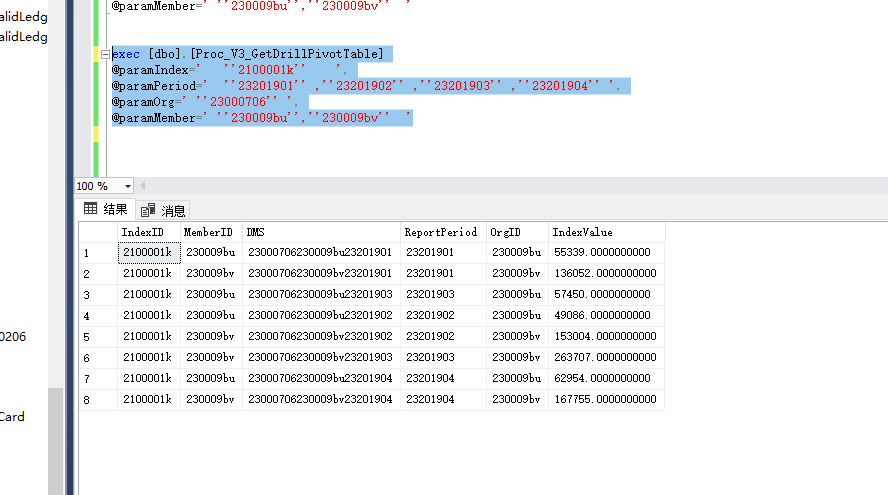
For the time being, but I don't know why
- I think you have permission to run stored procedures
- use the default port 1433
- Not SA account
- Parameter is no problem
- Parameter or permissions error(i think)
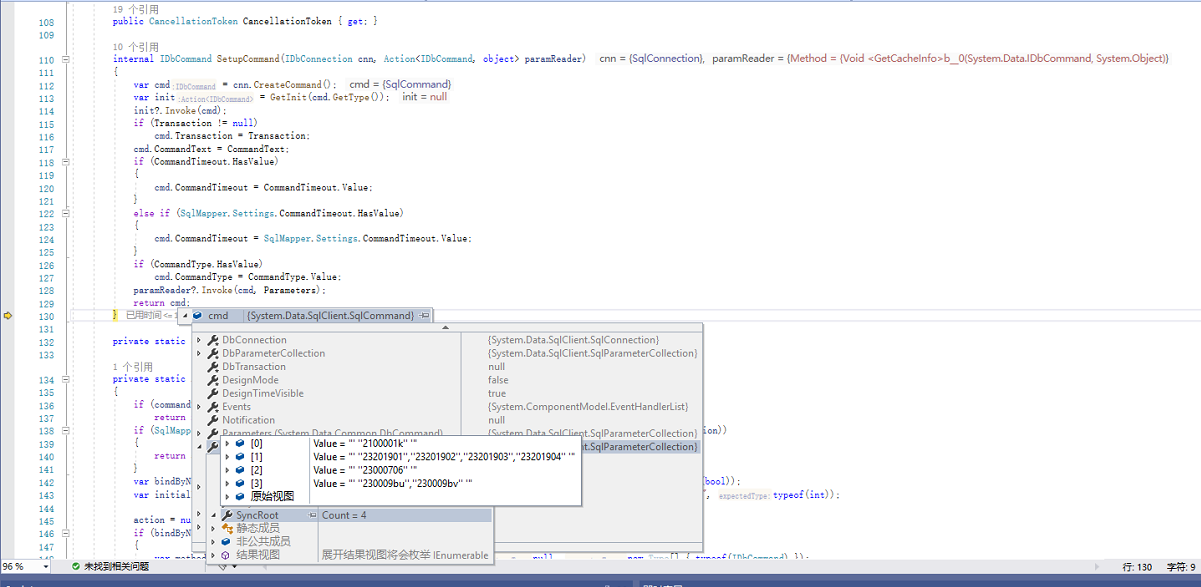
I'm a little confused, but I haven't found the reason yet. I investigate it
update 11/08/2019
problem that was driving me nuts, so I'll throw this in in case it helps someone along the line.
I could run the Proc SQL, or call a stored procedure with the same SQL, on SQL Server using Management Studio, from my Visual Studio code for an dotnet core web application project, I got an empty DataReader.
How could the same identical SQL return a resultset in Management Studio, but an empty DataReader in Visual Studio?
The answer was that I was running as a same user with samepermissions in the two tools.
Actually, my problem was one step more complicated.
other ideas, I can try
Contributor guide
No contributing guide indexed for this repository
First steps
- Read the whole issue, then the project's contributing guide.
- Comment on the issue to say you are picking it up — it saves two people doing the same work.
- Fork the repository and make your change on a branch.
- Open a pull request that references the issue number.
Research direction
No repository file or test is named. Start by comparing the Dapper Query calls using DynamicParameters and the anonymous object with the SQL Server Management Studio execution of Proc_V3_GetDrillPivotTable; done means determining why the DataReader is empty and documenting a reproducible cause or required change.
Written by the indexing model from the issue text.
Assessment
- Tech stack
- csharp, sql
- Domain
- databases
- Issue type
- Bug
- Difficulty
- 4/5
- Estimated time
- 3-5 days
- Activity status
- Stale
- Clarity
- Needs clarification
- Newbie friendliness
- 20/100