ClosedXML / ClosedXML/ClosedXML
XLWorkbook.SaveAs - Workbook with ActiveX button generated with incorrect data
- Dominant language
- C#
- Stars
- 5.7k
- Forks
- 933
- Avg merge
- 12h 14m
- Merged PRs (30d)
- 1
Description
## Read and complete the full issue template
Do not randomly delete sections. They are here for a reason.
**Do you want to request a *feature* or report a *bug*?**
- [x] Bug
- [ ] Feature
- [ ] Question
**Did you test against the latest CI build?**
- [x] Yes
- [ ] No
If you answered `No`, please test with [the latest development build](https://ci.appveyor.com/project/ClosedXML/ClosedXML/branch/develop/artifacts) first.
**Version of ClosedXML**
0.100.3 and latest develop 8dc0e70eb727b26e45da904fd5cd960853e0f3da built from source
**What is the current behavior?**
When creating a copy of an existing xlsx using `SaveAs` that includes a ActiveX button the resulting workbook is not the same as the original. I've crafted a slim test case/example that shows the workbook is different when opened.
**What is the expected behavior or new feature?**
That the workbook is duplicated correctly. It doesn't have to be a perfect match in terms of the generated xml but it should be functionally the same.
**Is this a regression from the previous version?**
I think this impacts all 0.100.x versions but haven't fully tested them all. Have confirmed it is working correctly in 0.97.0.
If you'd like me to run further tests against specific versions let me know and I will run them as best I can
## Reproducibility
**This is an important section. Read it carefully. Failure to do so will cause a 'RTFM' comment.**
The original workbook (`SheetWithButton.xlsx`)
Sheet1 has bbbbbbbbbbbbbbbbbbbbbb
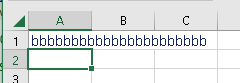
Sheet2 has aaaaaaaaaaaaaaaaaaaaaaaaaaaaaaa with a button

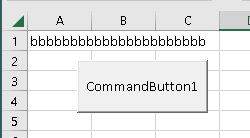
Run the code below using a plain `SaveAs` under a new name. Compare the resulting workbooks visually.
Sheet1 has bbbbbbbbbbbbbbbbbbbbbb

but Sheet2 now also has bbbbbbbbbbbbbbbbbbbbbb in the A1 cell with the button
**Code to reproduce problem:**
```c#
public void Main()
{
using var book = new XLWorkbook(@"SheetWithButton.xlsx");
book.SaveAs(@"SheetWithButtonCopy.xlsx");
}
```
- [x] I attached a sample spreadsheet. (You can drag files on to this issue)
input workbook needed [SheetWithButton.xlsx](https://github.com/ClosedXML/ClosedXML/files/10841892/SheetWithButton.xlsx)
for repro and an example of what I am getting when I generate the content on my side [SheetWithButtonCopy.xlsx](https://github.com/ClosedXML/ClosedXML/files/10841894/SheetWithButtonCopy.xlsx)
Contributor guide
Research direction
Start at the XLWorkbook.SaveAs entry point and reproduce the issue with the attached SheetWithButton.xlsx file using the provided C# example. Compare the original and generated workbooks, focusing on the ActiveX button and Sheet2 contents. Done means SaveAs produces a functionally identical workbook with the button and cell data preserved.
Written by the indexing model from the issue text.
Assessment
- Tech stack
- csharp
- Domain
- tooling
- Issue type
- Bug
- Difficulty
- 4/5
- Estimated time
- 3-5 days
- Activity status
- Stale
- Clarity
- Mostly clear
- Newbie friendliness
- 35/100