ClosedXML / ClosedXML/ClosedXML
Cell property HasComment is True but GetComment() returns empty object
- Dominant language
- C#
- Stars
- 5.7k
- Forks
- 933
- Avg merge
- 12h 14m
- Merged PRs (30d)
- 1
Description
**Do you want to request a *feature* or report a *bug*?**
- [x] Bug
- [ ] Feature
- [ ] Question
**Did you test against the latest CI build?**
- [x] Yes
- [ ] No
**Version of ClosedXML**
0.95.0
0.97.0
0.97.1 - preview
**What is the current behavior?**
I try to export google sheet with Notes as xlsx file.

And exported file looks like this in Excel. All Notes have been changed to Comments.
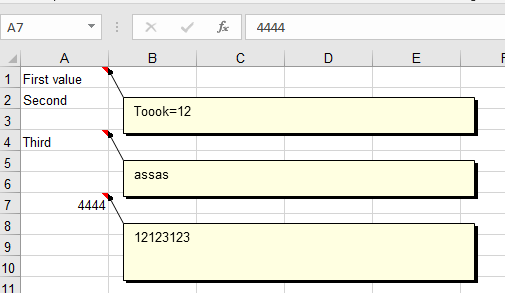
But when I try read comment in code the next behavior is a bit unexpected.
```c#
using ClosedXML.Excel;
using var workbook = new XLWorkbook(Path.Combine(Environment.CurrentDirectory, "Test ClosedXML.xlsx"));
workbook.TryGetWorksheet("Sheet1", out var sheet);
foreach (var row in sheet.Rows())
{
var cell = row.Cells().FirstOrDefault();
Console.WriteLine(cell?.Value.ToString() + ' ' + cell?.HasComment + ' ' + cell?.GetComment());
}
```
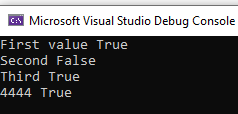
Also if I try resave the file all comments just disappear:
```c#
using ClosedXML.Excel;
using var workbook = new XLWorkbook(Path.Combine(Environment.CurrentDirectory, "Test ClosedXML.xlsx"));
workbook.SaveAs(Path.Combine(Environment.CurrentDirectory, "Result.xlsx"));
```

**What is the expected behavior or new feature?**
I'd like to read comments like in Excel file.
**Is this a regression from the previous version?**
I've checked this code on version 0.95.0 The problem is reproduced too.
## Reproducibility
**Code to reproduce problem:**
I'm using .Net 6. Test file has been attached to issue.
- First case
```c#
using ClosedXML.Excel;
using var workbook = new XLWorkbook(Path.Combine(Environment.CurrentDirectory, "Test ClosedXML.xlsx"));
workbook.TryGetWorksheet("Sheet1", out var sheet);
foreach (var row in sheet.Rows())
{
var cell = row.Cells().FirstOrDefault();
Console.WriteLine(cell?.Value.ToString() + ' ' + cell?.HasComment + ' ' + cell?.GetComment());
}
```
- Second case
```c#
using ClosedXML.Excel;
using var workbook = new XLWorkbook(Path.Combine(Environment.CurrentDirectory, "Test ClosedXML.xlsx"));
workbook.SaveAs(Path.Combine(Environment.CurrentDirectory, "Result.xlsx"));
```
- [x] I attached a sample spreadsheet. (You can drag files on to this issue)
[Test ClosedXML.xlsx](https://github.com/ClosedXML/ClosedXML/files/10074373/Test.ClosedXML.xlsx)
Contributor guide
Research direction
Start with the attached Test ClosedXML.xlsx and the two C# reproductions: load it, inspect HasComment/GetComment behavior, and save it again. Trace the comment import and save paths, then add coverage showing comments can be read and survive resaving.
Written by the indexing model from the issue text.
Assessment
- Tech stack
- csharp
- Domain
- tooling
- Issue type
- Bug
- Difficulty
- 4/5
- Estimated time
- 3-5 days
- Activity status
- Quiet
- Clarity
- Mostly clear
- Newbie friendliness
- 50/100