CleverRaven / CleverRaven/Cataclysm-DDA
Character creation - Background tab - UI audit
- Dominant language
- C++
- Stars
- 13.1k
- Forks
- 4.6k
- Avg merge
- 2d 1h
- Merged PRs (30d)
- 200
Description
### Describe the bug
The background tab of the character creation screen has several graphical and navigational issues. Some of these overlap with other character creation issues, but most appear to be independent. These include:
**Display issues**:
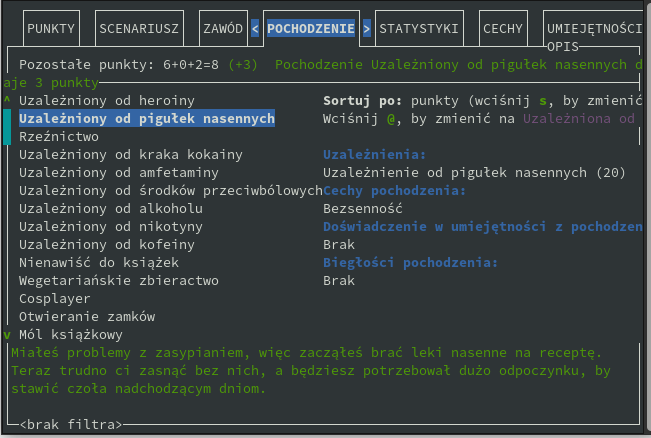
1] Background point cost prints over the border/wraps around on small screens, particularly with non-English languages
2] The sorting hint is cut off on small screens
3] The gender selection hint prints over the border on small screens
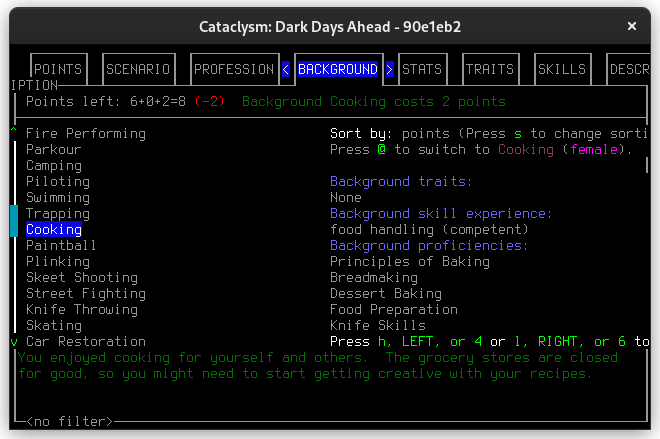
4] The background details column scrolls, but does not have a scrollbar indicating current position
5] Keybinding hints for scrolling the background details column are cut off on small screens
6] The background details column prints over the right border on small screens
7] This tab is very similar in presentation to the previous "SCENARIO" and "PROFESSION" tabs. However, in the previous tabs, only a single item could be selected, whereas on this tab, multiple backgrounds can be selected. There's currently no indication that multiple backgrounds can be selected
**Accessibility issues**:
8] The cursor is not set for screen readers
**Navigation issues**:
9] Use of `left arrow`/`right arrow`/`h`/`l` for scrolling up and down is unintuitive only used here and on the profession tab
10] A filter hint is shown, but the filter hotkey / is not
11] It's currently only possible to filter by background name, not by background skills/traits/proficiencies
12] No mouse support is available
13] To see the total impact of multiple selected backgrounds, it's currently necessary to go to the "DESCRIPTION" tab (e.g. if two different backgrounds provide experience in "applied science", what is the result of selecting both?
### Steps to reproduce
1. Open the game
2. Set language specified (if applicable)
3. Resize window to size specified (if described as 'small', assume 80x24)
4. New game
5. Custom character
6. `Tab` to "BACKGROUND"
### Expected behavior
- [ ] 1] Use "This background costs x points" rather than trying to fit the full background name
- [x] 2] The sorting hint should fold/truncate cleanly on all screen sizes (#59653)
- [x] 3] The gender selection hint should fold/truncate cleanly on all screen sizes (#59653)
- [x] 4] The background details column should have a scrollbar (#59653)
- [x] 5] Keybinding hints should fold/truncate cleanly on all screen sizes (#59653)
- [x] 6] Nothing should print over the border (#59653)
- [ ] 7] There should be some indicator differentiating between single-selection screens (e.g. the "SCENARIO" and "PROFESSION" tabs) and multiple-selection screens (such as this tab)
- [ ] 8] The cursor should be set for screen readers according to [accessibility.md](https://github.com/CleverRaven/Cataclysm-DDA/blob/master/doc/ACCESSIBILITY.md)
- [x] 9] The background details should be scrollable with a set of keys more commonly used for scrolling (`<`/`>` is probably the most common, though it's also becoming more commonly used for expand/collapse) (#59653)
- [x] 10] The filter hotkey should be shown, similar to the inventory screen (i) (#59653)
- [ ] 11] It should be possible to filter by background contents, not just by name
- [ ] 12] It should be possible to: select a background with left click, mouse-over/mousewheel scroll through the options, and select a different tab with left click.
- [ ] 13) If a background provides skill experience that builds upon skills that the character already has, this should be indicated
### Screenshots
1] Background point cost prints over the border/wraps around on small screens, particularly with non-English languages, and
2] The sorting hint is cut off on small screens, and
3] The gender selection hint prints over the border on small screens
4] The background details column scrolls, but does not have a scrollbar indicating current position, and
5] Keybinding hints for scrolling the background details column are cut off on small screens, and
6] The background details column prints over the right border on small screens
### Versions and configuration
Tiles
- OS: Linux
- OS Version: LSB Version: n/a; Distributor ID: Arch; Description: Arch Linux; Release: rolling; Codename: n/a;
- Game Version: 90e1eb2 [64-bit]
- Graphics Version: Tiles
- Game Language: System language []
- Mods loaded: [
Dark Days Ahead [dda],
Disable NPC Needs [no_npc_food],
No Fungal Growth [no_fungal_growth],
Bionic Professions [package_bionic_professions]
]
Curses
- OS: Linux
- OS Version: LSB Version: n/a; Distributor ID: Arch; Description: Arch Linux; Release: rolling; Codename: n/a;
- Game Version: 0.F-8820-g82afe217e14-dirty [64-bit]
- Graphics Version: Curses
- Game Language: System language []
- Mods loaded: [
Dark Days Ahead [dda],
Disable NPC Needs [no_npc_food],
No Fungal Growth [no_fungal_growth],
Bionic Professions [package_bionic_professions]
]
### Additional context
For clarification of some of my UI terminology (e.g. scroll vs. fast scroll, column vs. pane), refer to my general notes [here](https://gist.github.com/ZeroInternalReflection/a4a1bbd30cf5fbee4141b5f0e7d6719a)
Contributor guide
Research direction
Start at New game > Custom character > BACKGROUND and read doc/ACCESSIBILITY.md for the screen-reader requirement. Separate the remaining unchecked concerns—point-cost layout, selection indication, content filtering, mouse support, and cumulative skill impact—into scoped work; done means the selected behavior works in the 80x24 and language scenarios described.
Written by the indexing model from the issue text.
Assessment
- Tech stack
- cpp
- Domain
- accessibility, design, game-dev
- Issue type
- Bug
- Difficulty
- 5/5
- Estimated time
- Over a week
- Activity status
- Stale
- Clarity
- Needs clarification
- Newbie friendliness
- 25/100