ChenYilong / ChenYilong/iOSBlog
iOS 常见耗电量检测方案调研
- Dominant language
- Objective-C
- Stars
- 1.1k
- Forks
- 184
- PR merge metrics
- No merged PRs in 30d
Description
# iOS 常见耗电量检测方案调研
本文对应 Demo 以及 Markdown 文件在 [ GitHub 仓库中]( https://github.com/ChenYilong/iOSBlog/blob/master/Tips/iOS常见耗电量检测方案调研/iOS常见耗电量检测方案调研.md ),文中的错误可以提 PR 到这个文件,我会及时更改。
- [前言](#%E5%89%8D%E8%A8%80)
- [系统接口](#%E7%B3%BB%E7%BB%9F%E6%8E%A5%E5%8F%A3)
- [测试平台](#%E6%B5%8B%E8%AF%95%E5%B9%B3%E5%8F%B0)
- [常用的电量测试方法:](#%E5%B8%B8%E7%94%A8%E7%9A%84%E7%94%B5%E9%87%8F%E6%B5%8B%E8%AF%95%E6%96%B9%E6%B3%95)
- [软件工具检测](#%E8%BD%AF%E4%BB%B6%E5%B7%A5%E5%85%B7%E6%A3%80%E6%B5%8B)
- [iOS电量测试方法](#ios%E7%94%B5%E9%87%8F%E6%B5%8B%E8%AF%95%E6%96%B9%E6%B3%95)
- [1.iOS 设置选项 ->开发者选项->logging ->start recording](#1ios-%E8%AE%BE%E7%BD%AE%E9%80%89%E9%A1%B9--%E5%BC%80%E5%8F%91%E8%80%85%E9%80%89%E9%A1%B9logging-start-recording)
- [2.进行需要测试电量的场景操作后进入开发者选项点击stop recording](#2%E8%BF%9B%E8%A1%8C%E9%9C%80%E8%A6%81%E6%B5%8B%E8%AF%95%E7%94%B5%E9%87%8F%E7%9A%84%E5%9C%BA%E6%99%AF%E6%93%8D%E4%BD%9C%E5%90%8E%E8%BF%9B%E5%85%A5%E5%BC%80%E5%8F%91%E8%80%85%E9%80%89%E9%A1%B9%E7%82%B9%E5%87%BBstop-recording)
- [3.将iOS设备和Mac连接](#3%E5%B0%86ios%E8%AE%BE%E5%A4%87%E5%92%8Cmac%E8%BF%9E%E6%8E%A5)
- [4.打开Instrument,选择Energy Diagnostics](#4%E6%89%93%E5%BC%80instrument%E9%80%89%E6%8B%A9energy-diagnostics)
- [5.选择 File > Import Logged Data from Device](#5%E9%80%89%E6%8B%A9-file--import-logged-data-from-device)
- [6.保存的数据以时间轴输出到Instrument面板](#6%E4%BF%9D%E5%AD%98%E7%9A%84%E6%95%B0%E6%8D%AE%E4%BB%A5%E6%97%B6%E9%97%B4%E8%BD%B4%E8%BE%93%E5%87%BA%E5%88%B0instrument%E9%9D%A2%E6%9D%BF)
- [其他](#%E5%85%B6%E4%BB%96)
- [硬件检测](#%E7%A1%AC%E4%BB%B6%E6%A3%80%E6%B5%8B)
## 前言
如果我们想看下我们的 APP 或 SDK 是否耗电,需要给一些数据来展示,所以就对常见的电量测试方案做了一下调研。
影响 iOS 电量的因素,几个典型的耗电场景如下:
1. 定位,尤其是调用GPS定位
2. 网络传输,尤其是非Wifi环境
3. cpu频率
4. 内存调度频度
5. 后台运行
## 系统接口
iOS 10 系统内置的 Setting 里可以查看各个 App 的电池消耗。
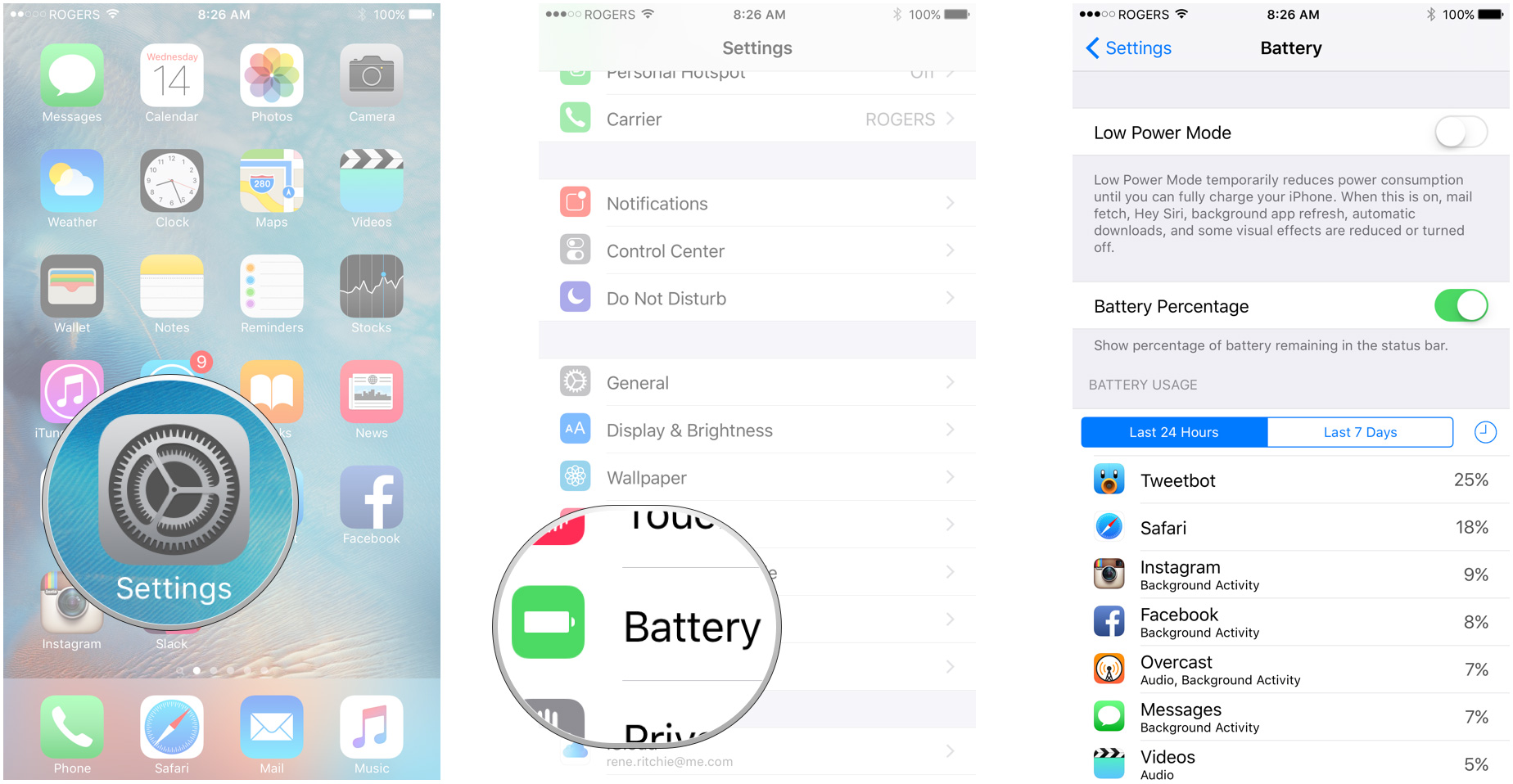
系统接口,能获取到整体的电池利用率,以及充电状态。代码演示如下:
```Objective-C
//#import
UIDevice *device = [UIDevice currentDevice];
device.batteryMonitoringEnabled = YES;
//UIDevice返回的batteryLevel的范围在0到1之间。
NSUInteger batteryLevel = device.batteryLevel * 100;
//获取充电状态
UIDeviceBatteryState state = device.batteryState;
if (state == UIDeviceBatteryStateCharging || state == UIDeviceBatteryStateFull) {
//正在充电和电池已满
}
```
这些均不符合我们的检测需求,不能检测固定某一时间段内的电池精准消耗。
## 测试平台
**阿里云移动测试[MQC](http://mqc.yunos.com)**
[MQC](http://mqc.yunos.com) 调研,结论:没有iOS性能测试,无法提供耗电量指标。
解释 | 截图
-------------|-------------
安卓有性能测试项目|  |
安卓的性能测试项目 | |
iOS没有性能测试,无法提供耗电量指标| 
百度移动云测试中心 MTC 同样没有 iOS 的性能测试。
其他测试平台类似。
## 常用的电量测试方法:
1. 硬件测试
2. 软件工具检测
## 软件工具检测
下面介绍通过软件 Instrument 来进行耗电检测。
## iOS电量测试方法
#### 1.iOS 设置选项 ->开发者选项->logging ->start recording

#### 2.进行需要测试电量的场景操作后进入开发者选项点击stop recording
#### 3.将iOS设备和Mac连接
#### 4.打开Instrument,选择Energy Diagnostics
#### 5.选择 File > Import Logged Data from Device

#### 6.保存的数据以时间轴输出到Instrument面板

#### 其他
- 测试过程中要断开 iOS设备和电脑、电源的连接
- 电量使用level为0-20,1/20:表示运行该app,电池生命会有20个小时;20/20:表示运行该app,电池电量仅有1小时的生命
- 数据不能导出计算,只能手动计算平均值
## 硬件检测
通过硬件 [PowerMonitor]( https://www.msoon.com/LabEquipment/PowerMonitor/ ) 可以精准地获得应用的电量消耗。
步骤如下:
1. 拆开iOS设备的外壳,找到电池后面的电源针脚。
2. 连接电源监控器的设备针脚
3. 运行应用
4. 测量电量消耗
下图展示了与iPhone的电池针脚连接的电源监控器工具。

可以参考:[**Using Monsoon Power Monitor with iPhone 5s**]( https://www.bottleofcode.com/2015/07/12/using-monsoon-power-monitor-with-iphone-5s/)。
- 可以精准地获得应用的电量消耗。
- 设备价格 $771.00 USD
- 需要拆解手机
这样看来,只有 Instrument 的方案更适合,大家有什么方案的话,也可以贴在下面。

Contributor guide
No contributing guide indexed for this repository
Assessment
This issue has not been assessed yet.