setScaleMinima causes crash
- Dominant language
- Swift
- Stars
- 28k
- Forks
- 6k
- PR merge metrics
- No merged PRs in 30d
Description
Here is the portion of the code:
```
chartView.data = data
chartView.fitScreen()
chartView.setVisibleXRangeMaximum(min(13, getDouble(anything: arrayXData.count)))
chartView.setScaleMinima(1, scaleY: 1)
```
Above code was working perfectly and all the data are visible in the view.
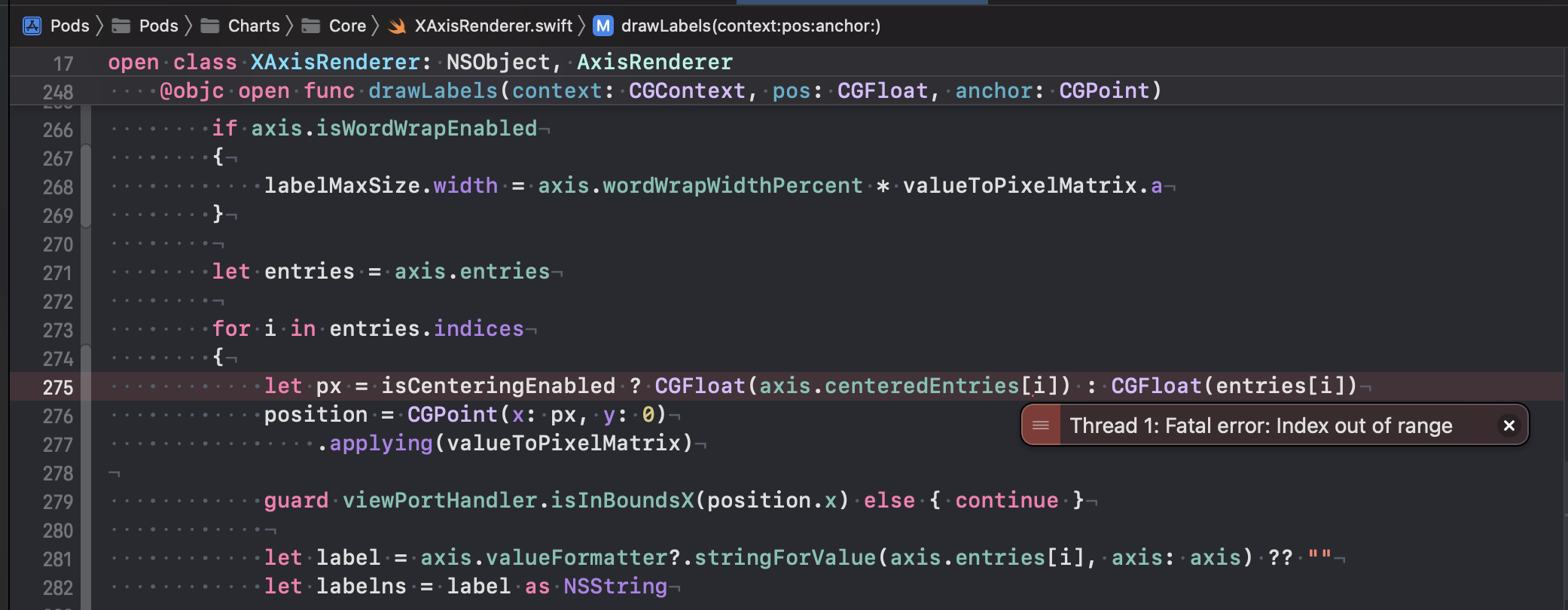
BUT after updating to (4.1.0) the app get crashed at
XAxisRenderer.swift
```
/// draws the x-labels on the specified y-position
@objc open func drawLabels(context: CGContext, pos: CGFloat, anchor: CGPoint)
{
.
.
.
for i in entries.indices
{
let px = isCenteringEnabled ? CGFloat(axis.centeredEntries[i]) : CGFloat(entries[I])
.
.
```
Throwing Index Out of bounds.
Patch solution for now is I need to make
chartView.setScaleMinima(**1.001**, scaleY: 1)
I do put .00 as I don't want any scroll at all.
Need a solution to fix it to make working with scale minima x and y as 1.
**Charts version: Charts (4.1.0)**
**Xcode 14:**
**Swift 5.7:**
Contributor guide
Assessment
This issue has not been assessed yet.