Updating data on LineChartView does not respect the mentioned settings after reassigning the same data and settings
- Dominant language
- Swift
- Stars
- 28k
- Forks
- 6k
- PR merge metrics
- No merged PRs in 30d
Description
## What did you do?
I have used a LineChartView to show data for 12 months and on button tap, the same chart is used to display data for 5 years. On another toggle action, the same 12 months data is displayed on the LineChartView, but now the mentioned settings are not respected.
I have used the following settings:
`
enum SelectedFilter {
case byMonth
case byYear
}
let values = (selectedFilter == .byMonth) ? months : years //array of data
let lineFormatter = IndexAxisValueFormatter(values: values)
lineChartView.data = someData // values converted to proper LineChartDataset and then to LineChartData
lineChartView.xAxis.axisMaximum = selectedFilter == .byMonth ? Double(values.count-1) : Double(values.count)
// no idea, but 1 less than expected works
lineChartView.xAxis.labelCount = selectedFilter == .byMonth ? 11 : 4
let maxVisibleCountInLineChart:Double = selectedFilter == .byMonth ? 12 : 4
lineChartView.setVisibleXRangeMaximum(maxVisibleCountInLineChart)
`
## What did you expect to happen?
If I have mentioned the appropriate settings and with data changed to the previous one, the LineChartView should show the correct data with settings.
The chart works fine on first load,
The months data is shown as in figure. The chart should show all data without any scroll and it does fine.
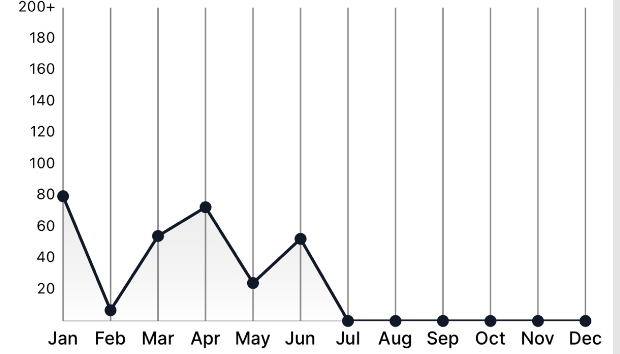
On button tap, the data is replaced with 5 years data.
The years data is shown as in figure and it is fine too. Here, four values should be seen at a time with provision to scroll to see next data and fetch next 5 years data which will be done later on.
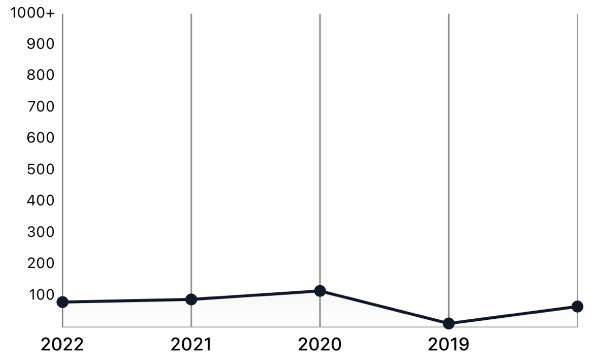
## What happened instead?
The problem arises when the filter button is tapped to load 12 months data again, upon which the chatView which was showing data correctly before, shows data in appropriate order and even scrolls which shouldn't. Please be aware that the code above is run again in order to set the data. Please see the screenshot below to understand the issue.
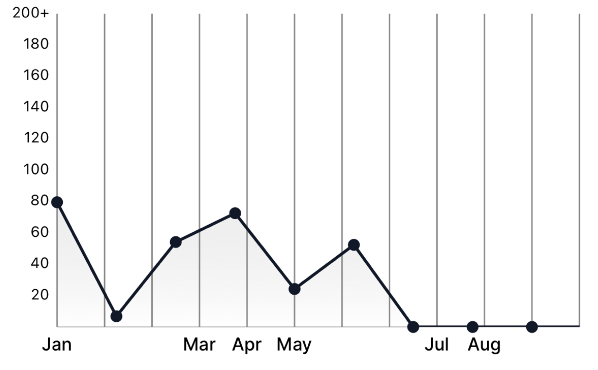
## Charts Environment
Charts Version: 3.6.0
Xcode Version: 13.0
Swift Version: 5.0
Platforms running Charts: iOS
macOS version running Xcode: macOS BigSur 11.3.1
Contributor guide
Assessment
This issue has not been assessed yet.