highlighted Barchart with negative values
- Dominant language
- Swift
- Stars
- 28k
- Forks
- 6k
- PR merge metrics
- No merged PRs in 30d
Description
## What did you do?
Hi, stacked bar chart with negative values the highlightFullBarEnabled dont work, I use the the demo code to reproduce and screenshot :
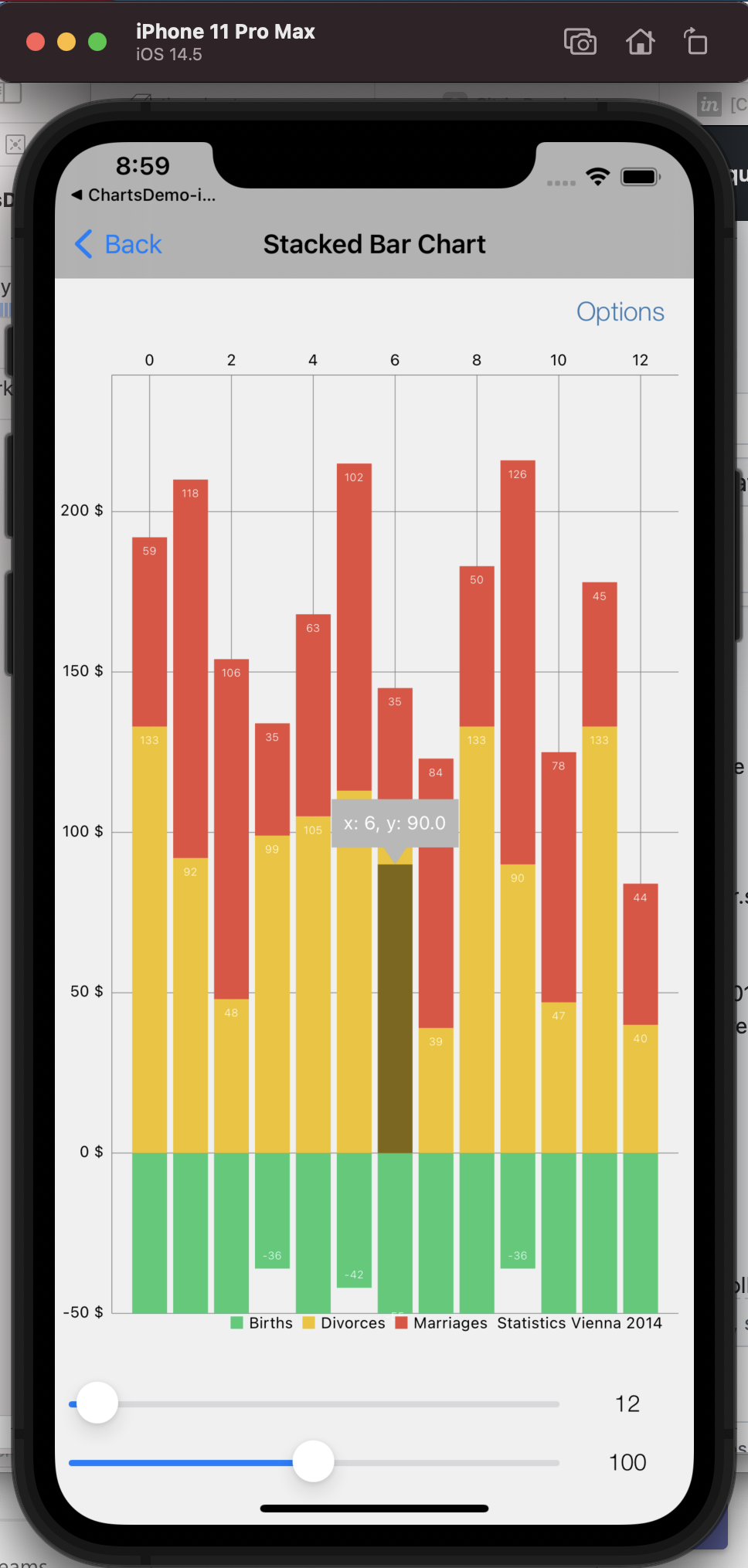
// StackedBarChartViewController.swift
// ChartsDemo-iOS
//
// Created by Jacob Christie on 2017-07-09.
// Copyright © 2017 jc. All rights reserved.
//
#if canImport(UIKit)
import UIKit
#endif
import Charts
class StackedBarChartViewController: DemoBaseViewController {
@IBOutlet var chartView: BarChartView!
@IBOutlet var sliderX: UISlider!
@IBOutlet var sliderY: UISlider!
@IBOutlet var sliderTextX: UITextField!
@IBOutlet var sliderTextY: UITextField!
lazy var formatter: NumberFormatter = {
let formatter = NumberFormatter()
formatter.maximumFractionDigits = 1
formatter.negativeSuffix = " $"
formatter.positiveSuffix = " $"
return formatter
}()
override func viewDidLoad() {
super.viewDidLoad()
// Do any additional setup after loading the view.
self.title = "Stacked Bar Chart"
self.options = [.toggleValues,
.toggleIcons,
.toggleHighlight,
.animateX,
.animateY,
.animateXY,
.saveToGallery,
.togglePinchZoom,
.toggleAutoScaleMinMax,
.toggleData,
.toggleBarBorders]
chartView.delegate = self
chartView.chartDescription.enabled = false
chartView.maxVisibleCount = 40
chartView.drawBarShadowEnabled = false
chartView.drawValueAboveBarEnabled = false
chartView.highlightFullBarEnabled = true
let leftAxis = chartView.leftAxis
leftAxis.valueFormatter = DefaultAxisValueFormatter(formatter: formatter)
leftAxis.axisMinimum = -50
chartView.rightAxis.enabled = false
let marker = XYMarkerView(color: UIColor(white: 180/250, alpha: 1),
font: .systemFont(ofSize: 12),
textColor: .white,
insets: UIEdgeInsets(top: 8, left: 8, bottom: 20, right: 8),
xAxisValueFormatter: chartView.xAxis.valueFormatter!)
marker.chartView = chartView
marker.minimumSize = CGSize(width: 80, height: 40)
chartView.marker = marker
let xAxis = chartView.xAxis
xAxis.labelPosition = .top
let l = chartView.legend
l.horizontalAlignment = .right
l.verticalAlignment = .bottom
l.orientation = .horizontal
l.drawInside = false
l.form = .square
l.formToTextSpace = 4
l.xEntrySpace = 6
sliderX.value = 12
sliderY.value = 100
slidersValueChanged(nil)
self.updateChartData()
}
override func updateChartData() {
if self.shouldHideData {
chartView.data = nil
return
}
self.setChartData(count: Int(sliderX.value + 1), range: UInt32(sliderY.value))
}
func setChartData(count: Int, range: UInt32) {
let yVals = (0.. BarChartDataEntry in
let mult = range + 1
let val1 = Double(arc4random_uniform(mult) + mult / 3)
let val2 = Double(arc4random_uniform(mult) + mult / 3)
let val3 = Double(arc4random_uniform(mult) + mult / 3)
return BarChartDataEntry(x: Double(i), yValues: [-val1, val2, val3], icon: #imageLiteral(resourceName: "icon"))
}
let set = BarChartDataSet(entries: yVals, label: "Statistics Vienna 2014")
set.drawIconsEnabled = false
set.colors = [ChartColorTemplates.material()[0], ChartColorTemplates.material()[1], ChartColorTemplates.material()[2]]
set.stackLabels = ["Births", "Divorces", "Marriages"]
let data = BarChartData(dataSet: set)
data.setValueFont(.systemFont(ofSize: 7, weight: .light))
data.setValueFormatter(DefaultValueFormatter(formatter: formatter))
data.setValueTextColor(.white)
chartView.fitBars = true
chartView.data = data
}
override func optionTapped(_ option: Option) {
super.handleOption(option, forChartView: chartView)
}
@IBAction func slidersValueChanged(_ sender: Any?) {
sliderTextX.text = "\(Int(sliderX.value))"
sliderTextY.text = "\(Int(sliderY.value))"
updateChartData()
}
}
`
## What did you expect to happen?
ℹ Please replace this with what you expected to happen.
## What happened instead?
ℹ Please replace this with of what happened instead.
## Charts Environment
**Charts version/Branch/Commit Number:**
**Xcode version:**
**Swift version:**
**Platform(s) running Charts:**
**macOS version running Xcode:**
## Demo Project
ℹ Please link to or upload a project we can download that reproduces the issue.
Contributor guide
Research direction
Start with StackedBarChartViewController.swift in the supplied demo code and reproduce the stacked bar case containing negative values with highlightFullBarEnabled enabled. Trace the highlight behavior from that example and verify the result against the attached screenshot; done means the full bar highlights correctly for negative stacked values.
Written by the indexing model from the issue text.
Assessment
- Tech stack
- swift
- Domain
- data-visualization
- Issue type
- Bug
- Difficulty
- 3/5
- Estimated time
- 1-2 days
- Activity status
- Stale
- Clarity
- Needs clarification
- Newbie friendliness
- 35/100