Background fill in line chart is rendered in front of the graph
- Dominant language
- Swift
- Stars
- 28k
- Forks
- 6k
- PR merge metrics
- No merged PRs in 30d
Description
* [ x] I've read, understood, and done my best to follow the [*CONTRIBUTING guidelines](https://github.com/jjatie/Charts/blob/master/CONTRIBUTING.md).
## What did you do?
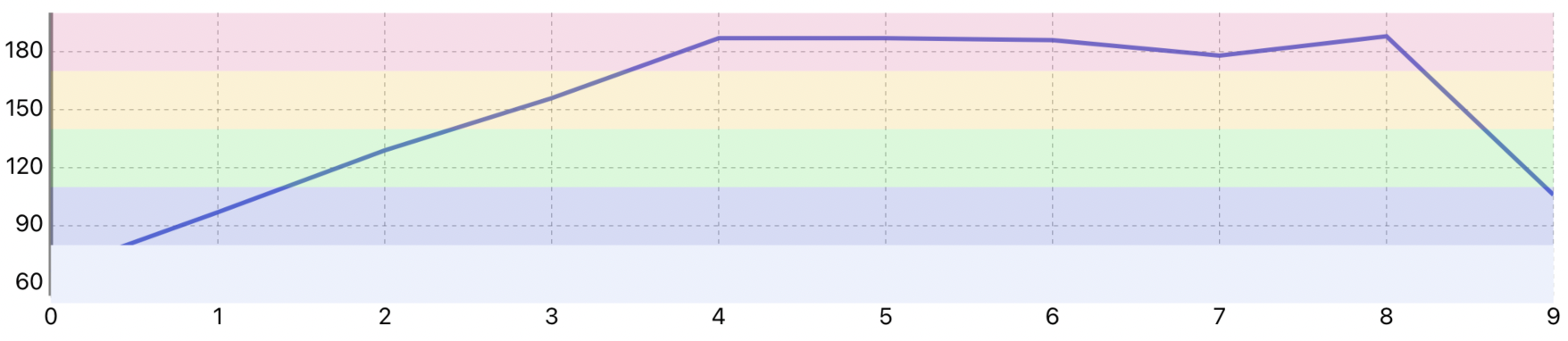
After reading issue 645, I managed to render the background fill of my chart with different colors, each bounded with two limit lines.
## What did you expect to happen?
The lowest bounded background fill should be rendered behind the graph line
## What happened instead?
The lowest bounded background fill is rendered in front of the graph line
## Charts Environment
**Charts version/Branch/Commit Number:** v4.0.1 Release
**Xcode version:**12.5
**Swift version:**5
**Platform(s) running Charts:** iPadOS
**macOS version running Xcode:** 11.2.3 Big Sur
## Demo Project
open func renderLimitFill(context: CGContext) {
let colors:[UIColor] =
[
UIColor(red: 236.0/255.0, green: 241.0/255.0, blue: 253.0/255.0, alpha: 1.0),
UIColor(red: 47.0/255.0, green: 73.0/255.0, blue: 209.0/255.0, alpha: 0.2),
UIColor(red: 47.0/255.0, green: 225.0/255.0, blue: 65.0/255.0, alpha: 0.2),
UIColor(red: 245.0/255.0, green: 184.0/255.0, blue: 28.0/255.0, alpha: 0.2),
UIColor(red: 237.0/255.0, green: 79.0/255.0, blue: 145.0/255.0, alpha: 0.2)
]
var limitLines = axis.limitLines
limitLines.sort{ $0.limit < $1.limit }
print(limitLines)
if limitLines.count != 6 {
return
}
let trans = self.transformer!.valueToPixelMatrix
for i in 0 ..< limitLines.count-1 {
context.saveGState()
if !limitLines[i+1].isEnabled && !limitLines[i].isEnabled {
continue
}
let upper: Double = limitLines[i+1].limit
let lower: Double = limitLines[i].limit
if upper == lower {
return
}
var startPosition = CGPoint(x: 0.0, y: 0.0)
startPosition.x = 0.0
startPosition.y = CGFloat(upper)
startPosition = startPosition.applying(trans)
var endPosition = CGPoint(x: 0.0, y: 0.0)
endPosition.y = CGFloat(lower)
endPosition = endPosition.applying(trans)
endPosition.x = viewPortHandler.contentRight
let rect = CGRect(x: min(startPosition.x, endPosition.x),
y: min(startPosition.y, endPosition.y),
width: abs(startPosition.x - endPosition.x),
height: abs(startPosition.y - endPosition.y))
context.setFillColor(colors[i].cgColor)
context.setLineWidth(0.0)
context.addRect(rect)
context.drawPath(using: .fillStroke)
context.restoreGState()
}
}
Contributor guide
Assessment
This issue has not been assessed yet.