Close marker with click in the marker
- Dominant language
- Swift
- Stars
- 28k
- Forks
- 6k
- PR merge metrics
- No merged PRs in 30d
Description
## What did you do?
I use a custom marker that I created with XIB file ( view, label, image..) and I insert in the line chart and all is good
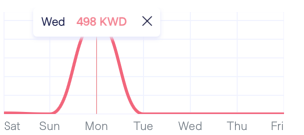
## What did you expect to happen?
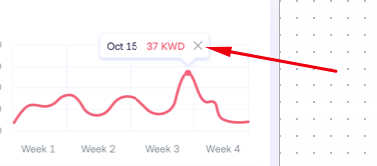
I need to close the marker with the close button
## What happened instead?
every time I try to close the marker, it show a new marker with the new position, only the last marker it close fine
## Charts Environment
**Charts version/Branch/Commit Number: 3.4.0
**Xcode version: 11.3.1
**Swift version: 5
**macOS version running Xcode: 10.14.6
Contributor guide
Research direction
Reproduce the issue with a custom XIB marker in a line chart using Charts 3.4.0, then trace how marker taps and close-button taps are handled. Done means tapping the close button removes the current marker without creating or repositioning another marker.
Written by the indexing model from the issue text.
Assessment
- Tech stack
- swift
- Domain
- data-visualization, mobile-dev
- Issue type
- Bug
- Difficulty
- 3/5
- Estimated time
- 1-2 days
- Activity status
- Stale
- Clarity
- Mostly clear
- Newbie friendliness
- 35/100