Chart viewport change height when it has no data
- Dominant language
- Swift
- Stars
- 28k
- Forks
- 6k
- PR merge metrics
- No merged PRs in 30d
Description
* [x] I've read, understood, and done my best to follow the [*CONTRIBUTING guidelines](https://github.com/jjatie/Charts/blob/master/CONTRIBUTING.md).
## What did you do?
Showing a line graph with and without data.
Setup:
lineChartView.drawBordersEnabled = false
lineChartView.drawMarkers = true
lineChartView.highlightPerTapEnabled = true
lineChartView.highlightPerDragEnabled = true
lineChartView.chartDescription = nil
lineChartView.leftAxis.enabled = false
lineChartView.isUserInteractionEnabled = true
lineChartView.dragXEnabled = true
lineChartView.dragYEnabled = false
lineChartView.setScaleEnabled(false)
lineChartView.pinchZoomEnabled = false
lineChartView.extraRightOffset = 10.0
lineChartView.extraLeftOffset = 16.0
lineChartView.noDataText = GSHLocalizedString(noDataTextId)
lineChartView.noDataFont = UIFont.wm330Light14
lineChartView.noDataTextAlignment = .center
lineChartView.noDataTextColor = .wmBlack
lineChartView.animate(xAxisDuration: 0.5)
axis minimum and maximum is also set to 0-6
## What did you expect to happen?
Chart viewport height stays the same.
## What happened instead?
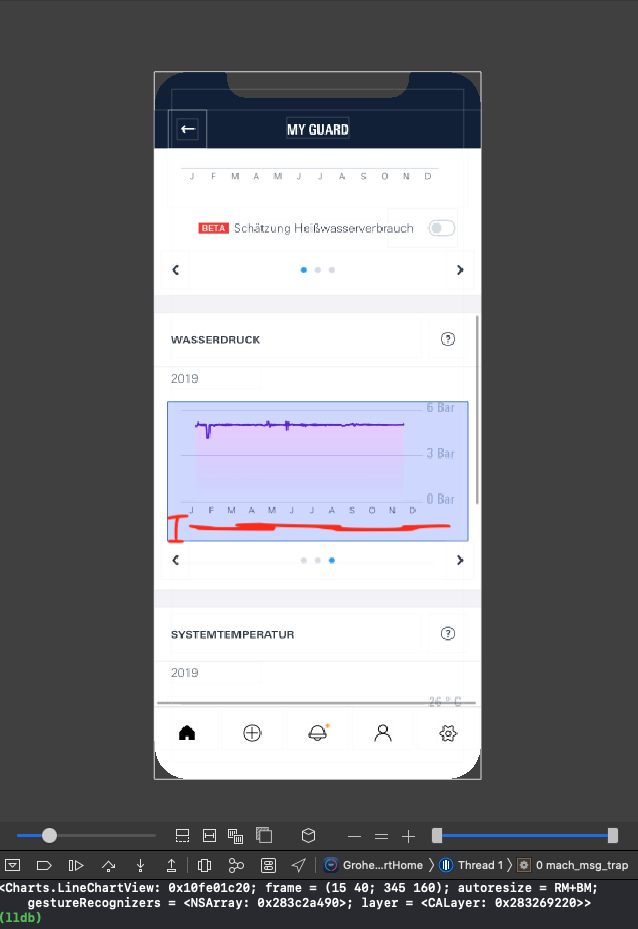
Chart viewport is expanding when there is no data. And shrinking chart inside the viewport when data is shown. See attached screenshots.
## Charts Environment
**Charts version/Branch/Commit Number: 3.4.0**
**Xcode version: 11.2.1**
**Swift version: 5.1**
**Platform(s) running Charts: iOS**
**macOS version running Xcode: Catalina**

Contributor guide
Assessment
This issue has not been assessed yet.