Legend is misplaced inside a cell
- Dominant language
- Swift
- Stars
- 28k
- Forks
- 6k
- PR merge metrics
- No merged PRs in 30d
Description
* [x] I've read, understood, and done my best to follow the [*CONTRIBUTING guidelines](https://github.com/jjatie/Charts/blob/master/CONTRIBUTING.md).
## What did you do?
I'm using a LineChartView inside a cell. In awake from nib I'm applying this:
```swift
xAxis.labelPosition = .bottom
xAxis.labelFont = .boldSystemFont(ofSize: 10)
xAxis.labelTextColor = UIColor(hex: 0x6C6C6C)
xAxis.drawGridLinesEnabled = false
rightAxis.enabled = false
leftAxis.labelTextColor = UIColor(hex: 0x6C6C6C)
leftAxis.labelFont = .boldSystemFont(ofSize: 10)
leftAxis.drawAxisLineEnabled = false
leftAxis.gridColor = UIColor(hex: 0x6C6C6C)
legend.setCustom(entries: [legendEntry(title: "Values", color: style.primaryColor),
legendEntry(title: "Goal", color: style.secondaryColor),
legendEntry(title: "Goal Trend Reference", color: style.tertiaryColor)])
legend.font = .boldSystemFont(ofSize: 10)
legend.horizontalAlignment = .center
legend.textColor = UIColor(hex: 0x6C6C6C)
setVisibleXRange(minXRange: 1, maxXRange: 7)
scaleXEnabled = false
scaleYEnabled = false
pinchZoomEnabled = false
dragEnabled = false
doubleTapToZoomEnabled = false
highlightPerTapEnabled = false
highlightPerDragEnabled = false
```
## What did you expect to happen?
I expect the legend to be at the cender without overlaping one to the other.
## What happened instead?
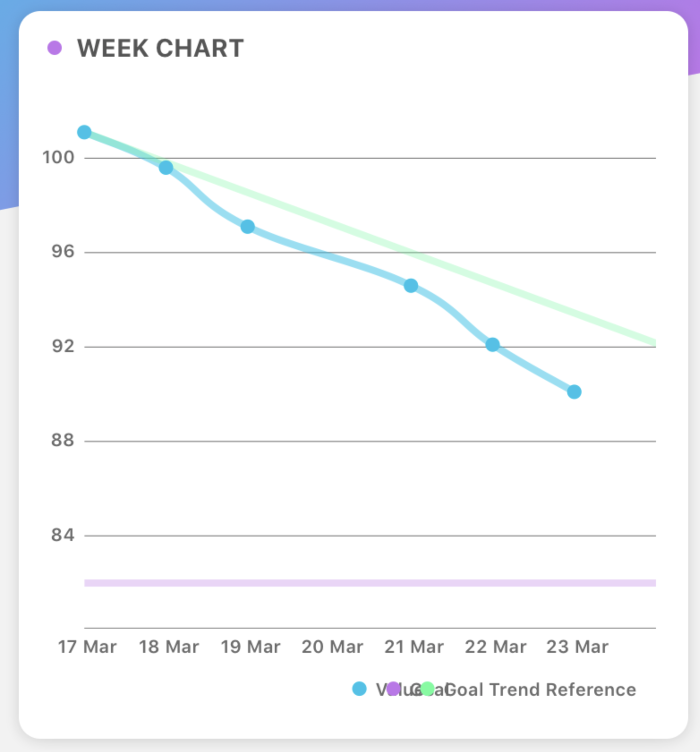
The legend is misplaced.
## Charts Environment
**Charts version/Branch/Commit Number: 3.2.2
**Xcode version: 10.1
**Swift version: 4.2
**Platform(s) running Charts: iPhone X - 12.1
**macOS version running Xcode: Mojave
## Demo Project
No demo project, sorry
Contributor guide
Assessment
This issue has not been assessed yet.