xAxis leading spacing for LineChartView
- Dominant language
- Swift
- Stars
- 28k
- Forks
- 6k
- PR merge metrics
- No merged PRs in 30d
Description
## Problem
I have a lineChartView object with the following data:
```
let model = [
LineChartModel.init(date: "S", percentage: 0.25),
LineChartModel.init(date: "M", percentage: 0.65),
LineChartModel.init(date: "T", percentage: 0.11),
LineChartModel.init(date: "W", percentage: 0.33),
LineChartModel.init(date: "T", percentage: 0.30),
LineChartModel.init(date: "F", percentage: 0.36),
LineChartModel.init(date: "S", percentage: 0.79)
]
```
I add the data to the chart by:
```
var lineChartEntry: [ChartDataEntry] = []
for point in data.enumerated() {
let entry = ChartDataEntry(x: Double(point.offset + 1), y: point.element.percentage)
lineChartEntry.append(entry)
}
let lineDataSet = LineChartDataSet(values: lineChartEntry, label: nil)
let data = LineChartData(dataSet: lineDataSet)
lineChartView.data = data
lineChartView.notifyDataSetChanged()
```
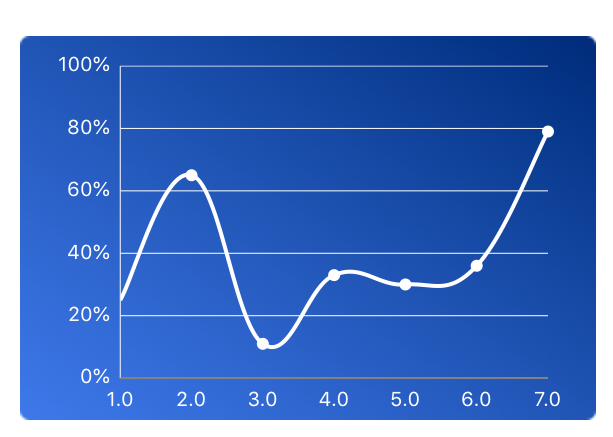
This renders the following where the first entry is clipped and not showing:
I tried: `chartView.xAxis.spaceMin = 1.0` but it's rendering without a circle for the first entry.
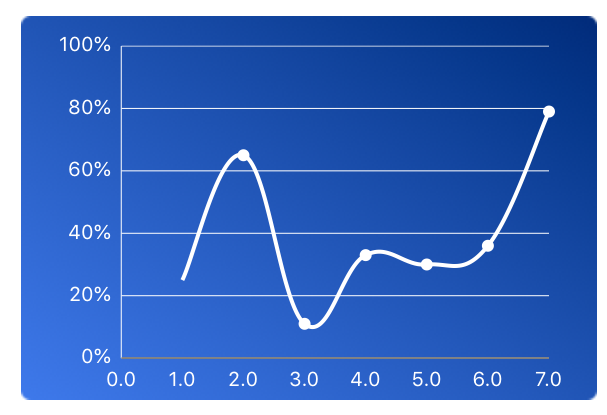
## What I want to achieve:
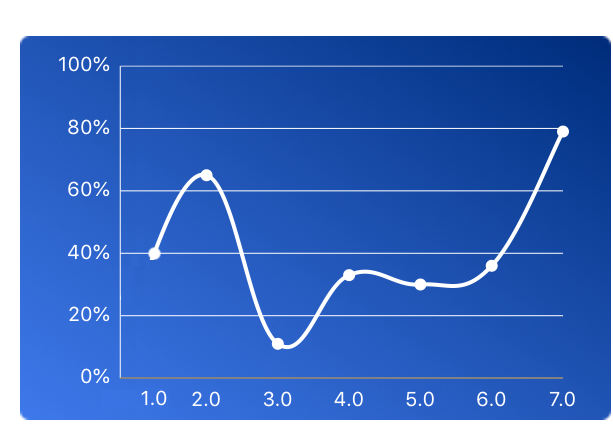
Add spacing before the horizontal axis starts, with the first circle rendered.
Here a visualization of what I want to achieve:
> Numbers in the following image is not accurate. Only the leading spacing matters here.
Contributor guide
Assessment
This issue has not been assessed yet.