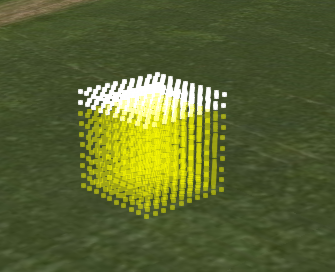
Point cloud with part opaque, part translucent style renders as translucent
- Dominant language
- JavaScript
- Stars
- 15.7k
- Forks
- 3.9k
- Avg merge
- 4d 6h
- Merged PRs (30d)
- 34
Description
A point cloud style that has translucent and opaque conditions will always be rendered as just translucent. This results in opaque points that look semi translucent when OIT is on.
A possible fix would be to render twice, once in the translucent pass (with opaque pixels masked out) and once in the opaque pass (with translucent pixels masked out), similar to b3dm/i3dm but without the per-tile checking.
```
color : {
conditions : [
['${POSITION}[2]<1.5', "color('#FFFF00', 0.5)"],
[true, "color('white')"]
]
}
```
Contributor guide
Research direction
Start from the point-cloud style rendering path and compare its opaque and translucent passes with the b3dm/i3dm behavior mentioned in the issue. Verify the mixed conditions with OIT enabled; done means translucent points remain translucent while opaque points render fully opaque.
Written by the indexing model from the issue text.
Assessment
- Tech stack
- javascript
- Domain
- computer-graphics
- Issue type
- Bug
- Difficulty
- 4/5
- Estimated time
- 3-5 days
- Activity status
- Stale
- Clarity
- Mostly clear
- Newbie friendliness
- 35/100