Lofting to an edge?
- Dominant language
- Python
- Stars
- 5.8k
- Forks
- 541
- Avg merge
- 3d 2h
- Merged PRs (30d)
- 5
Description
Hi All,
I am trying to join 3 solids (cubes for example), all with different rotations and positions is 3D. I can connect the faces easy enough but how can I fill in the center formed the the 3 cubes? See below a minimal example (red is the area I want to fill).
I was thinking the easiest would be to take the face of one of the connectors and loft it to the edge of the 3rd cube but as far as I know this is unsupported.
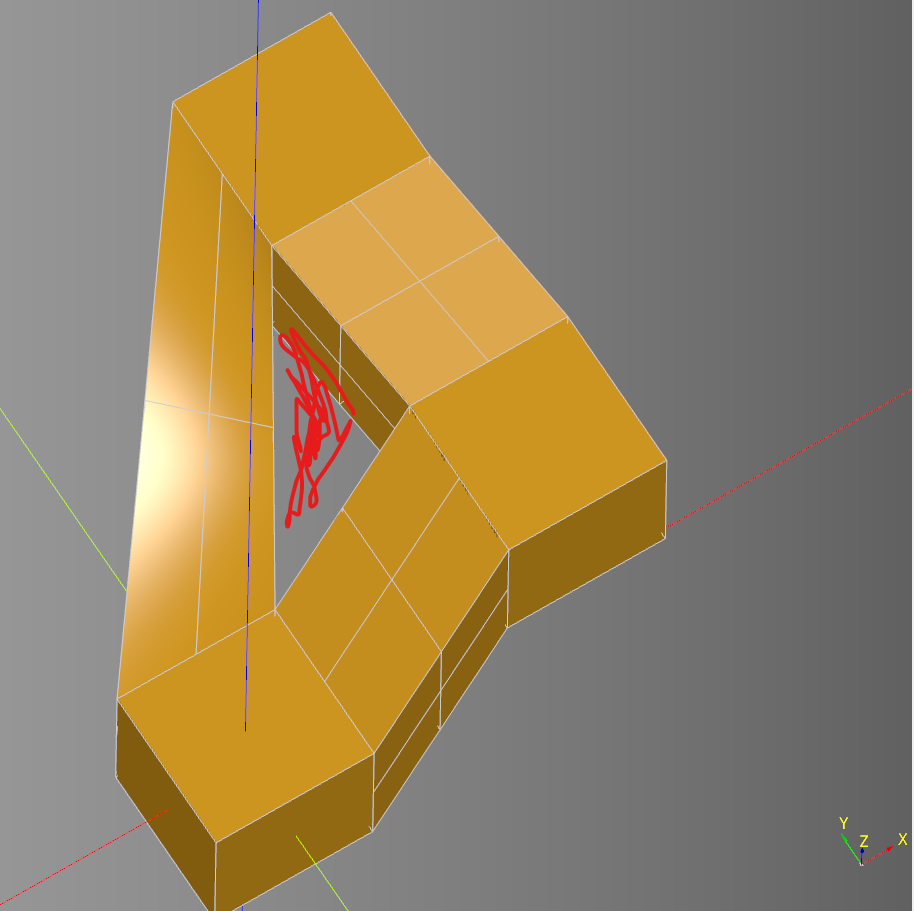
```python
import cadquery as cq
# add left cube
body = cq.Workplane('XY').box(1, 1, 1)
body.faces('>X').tag('a_right')
body.faces('>Y').tag('a_front')
# add right cube
body = body.workplane().transformed(offset=(2, .25, 1)).box(1, 1, 1)
body.faces('Y').tag('b_front')
# add front cube
body = body.workplane().transformed(offset=(-.25, 2, 1)).box(1, 1, 1)
body.faces('>>Y[-3]').tag('c_back')
body.faces('>X[-4]').tag('c_left')
# connect the three cubes
# connect left cube to front cube
body.wires(tag=f'a_front').toPending()
body.wires(tag=f'c_left').toPending()
body = body.add(body.loft())
# connect left cube to right cube
body.wires(tag=f'a_right').toPending()
body.wires(tag=f'b_left').toPending()
body = body.add(body.loft())
# connect right cube to front cube
body.wires(tag=f'c_back').toPending()
body.wires(tag=f'b_front').toPending()
body = body.add(body.loft())
show_object(body, name='example')
```
Contributor guide
No contributing guide indexed for this repository
Assessment
This issue has not been assessed yet.