Intersection of 2D objects
- Dominant language
- Python
- Stars
- 5.8k
- Forks
- 541
- Avg merge
- 3d 2h
- Merged PRs (30d)
- 5
Description
Hello,
as mentioned before I working on a specialized slicer for 3D printing and now I want to slice zero-volume objects (i.e. Faces) to create polylines (or open wires), which would represent my printhead movement. Now I created a sample Face:
```
v0 = cq.Vector(0, 0, 0)
v1 = cq.Vector(10, 5, 5)
v2 = cq.Vector(0, 0, 10)
v3 = cq.Vector(2, 10, 10)
v4 = cq.Vector(10, 7, 5)
e0 = cq.Edge.makeLine(v0, v1)
e1 = cq.Edge.makeLine(v2, v3)
curvedface=cq.Face.makeRuledSurface(e0,e1)
show_object(curvedface)
```
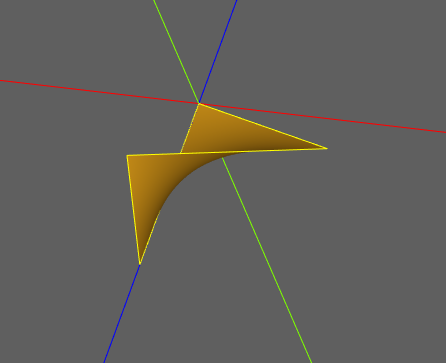
which I would want to slice, for example, at height 2 by using **.section()**
`sect=curvedface.section(2)`
but **.section()** requires a solid object to work. Is there a way to convert my Face to Solid to use **.section()** ? or is there an equivalent of **.intersect()** which could be applied to two Faces (one as shown above and the other one would be a generic flat XY plane) to yield a line?
Thanks for your help.
Contributor guide
No contributing guide indexed for this repository
Assessment
This issue has not been assessed yet.