svg export: ability to define the camera position and zoom
- Dominant language
- Python
- Stars
- 5.8k
- Forks
- 541
- Avg merge
- 3d 2h
- Merged PRs (30d)
- 5
Description
Let's start with this code:
```py
import cadquery as cq
from cadquery.cq import Workplane as WP
def fig(wp):
cube1 = WP(wp).box(5, 5, 5)
rod1 = WP(wp).circle(1).extrude(15)
return cube1.union(rod1)
svg_opts = {'height': 100, 'showHidden': False, 'showAxes': False}
cq.exporters.export(fig('XY'), 'fig1.svg', opt=svg_opts)
cq.exporters.export(fig('XZ'), 'fig2.svg', opt=svg_opts)
```
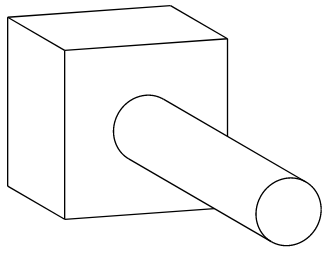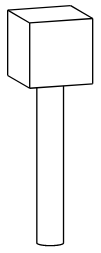
These images share the same height. But what I need is to have the same box size and position. So instead of defining svg `width` and `height` in svg export options, I would like to set the camera position and zoom.
My current hack is to add a "background plate", like this:
```py
bg = WP('ZX').transformed(offset=V(-3, 0, -5)).box(1, 17, 25)`)
```
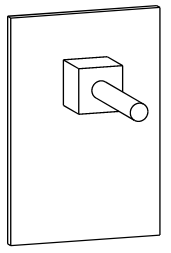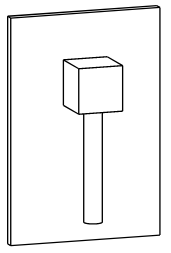
Then I remove this plate by editing the svg in Inkscape. But it's a little bit tedious.
Contributor guide
No contributing guide indexed for this repository
Assessment
This issue has not been assessed yet.