PositionAt/LocationAt returning wrong coordinates for edges of imported Dxf/Step curves
- Dominant language
- Python
- Stars
- 5.8k
- Forks
- 541
- Avg merge
- 3d 2h
- Merged PRs (30d)
- 5
Description
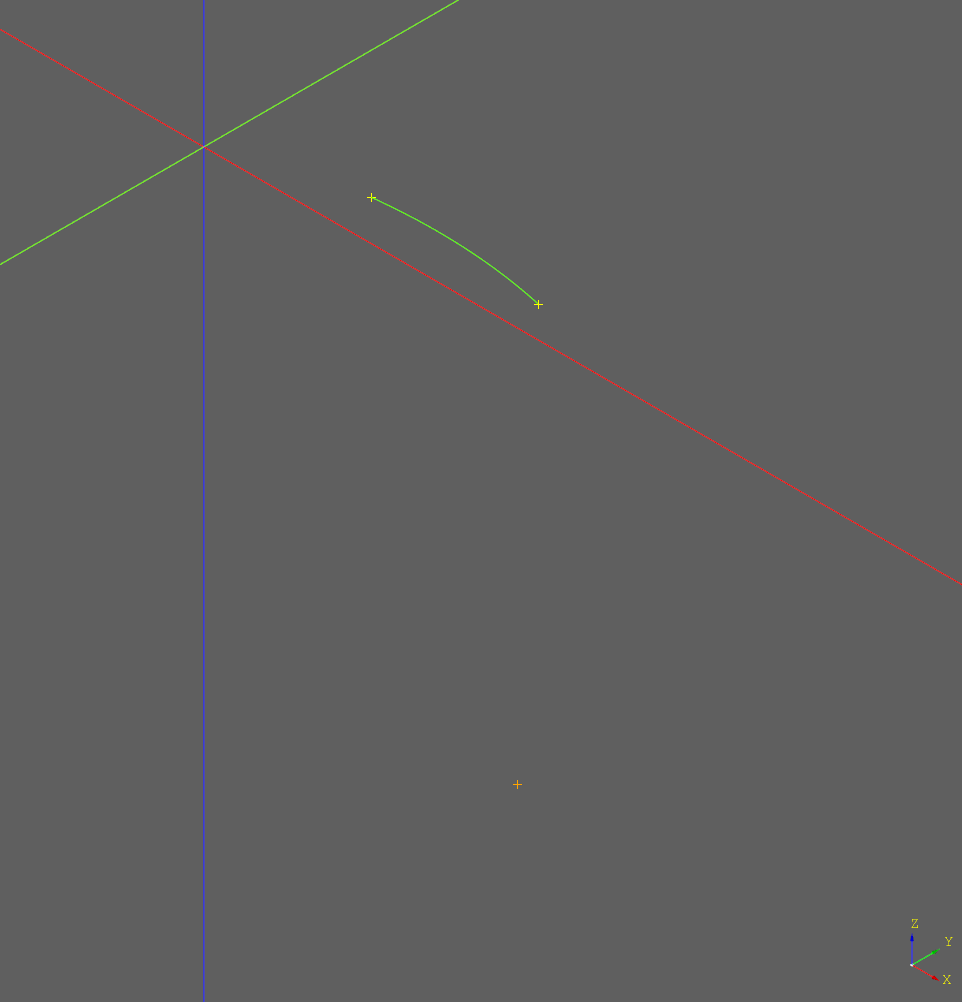
The case below tries to get the center point of the selected edge (in green), yet the returned position seems to be in some random place outside the edge/curve (orange dot).
I'd expect `locationAt`/`positionAt` to also function for imported curves/geometry.
When using `wires()` instead of `edges(..)`, the position returned by `positionAt`/`locationAt` is actually on the curve again - but that is a different use case.
I've added `start_point`/`end_point` just to test whether at least that data is available (yellow dots).
Curve used in the example case: [issue.zip](https://github.com/CadQuery/cadquery/files/6131882/issue.zip)
```python
curve = cq.importers.importDXF("issue.dxf").edges(">Y")
show_object(curve, options={"color":(100, 255, 0)})
t = curve.val().positionAt(0.5)
point = cq.Vertex.makeVertex(t.x, t.y, t.z)
show_object(point, options={"color":(255, 165, 0)})
start_point = curve.val().startPoint()
show_object(cq.Vertex.makeVertex(start_point.x, start_point.y, start_point.z))
end_point = curve.val().endPoint()
show_object(cq.Vertex.makeVertex(end_point.x, end_point.y, end_point.z))
```
Contributor guide
No contributing guide indexed for this repository
Assessment
This issue has not been assessed yet.