Question: fitting a shape in a surface
- Dominant language
- Python
- Stars
- 5.8k
- Forks
- 541
- Avg merge
- 3d 2h
- Merged PRs (30d)
- 5
Description
Imagine I have a surface like this:
```python
box = cq.Workplane("XY").box(10, 10, 4) \
.faces(">Z").workplane().hole(3)
surface = box.faces(">Z")
surface
```
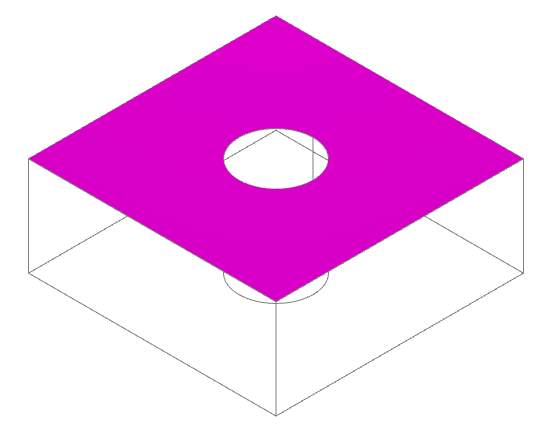
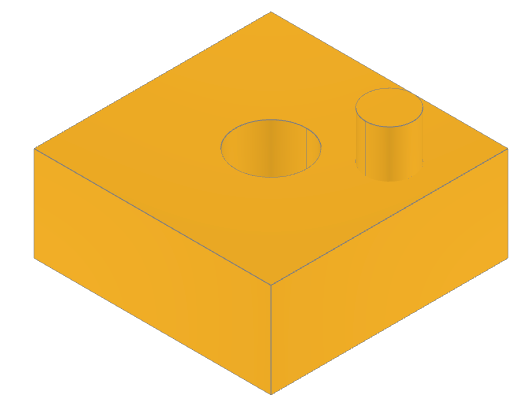
Now I want to place a cylinder on top of it, at a "random" position, but only if the whole cylinder's base sits on top of the surface. In example, this would be valid:
```python
position = (-2, 3)
surface.center(*position).circle(1).extrude(2)
```
But this would not:
```python
position = (-1, 1)
surface.center(*position).circle(1).extrude(2)
```
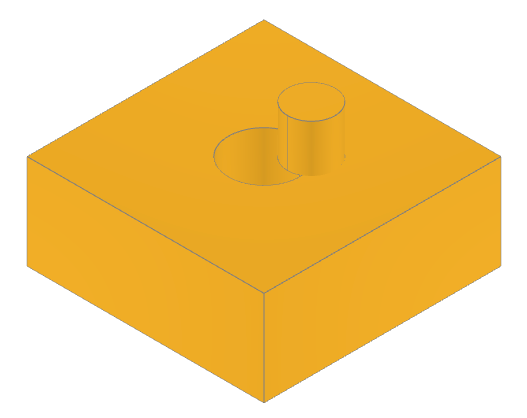
Is there a way to know if the circle (the cylinder's base) is fully contained in the surface?
The method should work for any surface shape (i.e.: not only for a perfectly squared surface with a perfect circle on the middle). The cylinder on top could also have a different shape in its base (like an irregular polygon).
I guess what I am looking for is a way to see if a face/polygon is contained in another face/polygon, right? The two faces/polygons are of course in the same plane.
Contributor guide
No contributing guide indexed for this repository
Assessment
This issue has not been assessed yet.