Offset edges in Sketch
- Dominant language
- Python
- Stars
- 5.8k
- Forks
- 541
- Avg merge
- 3d 2h
- Merged PRs (30d)
- 5
Description
Workplane `offset2D` works with edges.
```py
result = cq.Workplane().radiusArc((10, 10), 10).offset2D(2).extrude(2)
```
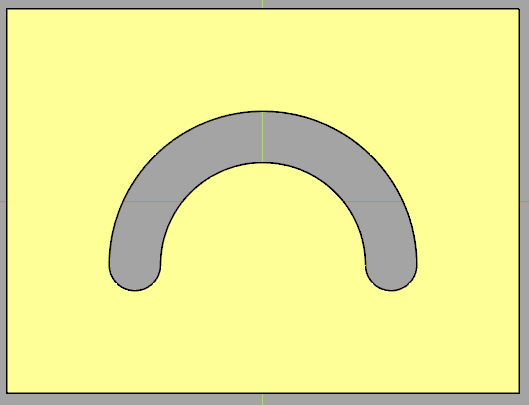
I'd like to offset edges in Sketch as well. The docstring mentions support of edges though it is not implemented yet.
This does not work:
```py
s = cq.Sketch().arc((-20, 0), (0, 20), (20, 0)).edges().offset(4)
result = (
cq.Workplane()
.box(80, 80, 5)
.faces(">Z")
.placeSketch(s)
.extrude("next", combine="s")
)
```
In 2.2.0 or current master `offset` works with selected wires. This is working:
```py
s = (
cq.Sketch()
.segment((0, 0), (10, 0))
.segment((0, 10))
.close()
.assemble()
.wires()
.offset(2)
.clean()
)
result = cq.Workplane().placeSketch(s).extrude(5)
```
This does not work currently:
```py
s = cq.Sketch().segment((0, 0), (10, 0)).segment((0, 10)).close().edges().offset(2)
r = cq.Workplane().placeSketch(s).extrude(5)
```
Proposed changes:
1. Provide feature to offset selected edges
2. When no wires or edges are selected, provide feature to offset (unselected) sketch edges so that locations are applied (using `push`)
Example of (2), offset unselected edges:
```py
s = cq.Sketch().push([(-20, -10)]).arc((0, 0), (20, 20), (40, 0)).offset(4)
result = (
cq.Workplane()
.box(80, 60, 5)
.faces(">Z")
.placeSketch(s)
.extrude("next", combine="s")
)
```
Contributor guide
No contributing guide indexed for this repository
Assessment
This issue has not been assessed yet.