Self-hosted agent deploy failure, logs don't indicate reason
- Dominant language
- No language data
- Stars
- 346
- Forks
- 67
- PR merge metrics
- No merged PRs in 30d
Description
**Describe the bug**
Azure Pipeline fails with generic error log, not indicating where, or what it was when task: AzureStaticWebApp@0 try to deploy pre-built Flutter Web App.
**To Reproduce**
Steps to reproduce the behavior:
1. Set up self hosted agent
2. Include staticwebapp.config.json
```json
{
"navigationFallback": {
"rewrite": "index.html"
},
"mimeTypes": {
".json": "text/json"
}
}
```
3. Run the Pipeline with the following steps
```yaml
pool:
default
steps:
- script: |
./vapp.sh fcc80c1d-6040-4e57-a23c-abb301653616 2 pwa
displayName: Build Dependencies
- task: AzureStaticWebApp@0
inputs:
workingDirectory: 'Pipeline/vapp'
app_location: 'build/web'
skip_api_build: true
skip_app_build: true
verbose: true
azure_static_web_apps_api_token: $(deployment_token)
```
4. Azure Pipeline task fails with no usable error log.
```
Starting: AzureStaticWebApp
==============================================================================
Task : Deploy Azure Static Web App
Description : [PREVIEW] Build and deploy an Azure Static Web App
Version : 0.203.0
Author : Microsoft Corporation
Help : https://aka.ms/swadocs
==============================================================================
/bin/bash /Pipeline/myagent/_work/_tasks/AzureStaticWebApp_18aad896-e191-4720-88d6-8ced4806941a/0.203.0/launch-docker.sh
stable: Pulling from appsvc/staticappsclient
Digest: sha256:c1fac5b3c048bc93533acf15079a926497d091e6a9e961e7ac878eb2679fe677
Status: Image is up to date for mcr.microsoft.com/appsvc/staticappsclient:stable
/bin/bash: warning: setlocale: LC_ALL: cannot change locale (en_US.UTF-8)
DeploymentId: 24168bfe-cb3b-4fc3-827f-bd01dd1c73b3
Verbose logging enabled
Build timeout not specified, defaulting to 15 minutes
App Directory Location: 'build/web' was found.
No Api directory specified. Azure Functions will not be created.
Looking for event info
Event info parsed from action options.
Skipping step to build /working_dir/build/web with Oryx
Found staticwebapp.config.json file: 'build/web/staticwebapp.config.json'
Didn't find Oryx manifest file under location: /ss-oryx/app-manifest/oryx-manifest.toml
Determined default file to be: index.html
Using 'staticwebapp.config.json' file for configuration information, 'routes.json' will be ignored.
An unknown exception has occurred
For further information, please visit the Azure Static Web Apps documentation at https://docs.microsoft.com/en-us/azure/static-web-apps/
If you believe this behavior is unexpected, please raise a GitHub issue at https://github.com/azure/static-web-apps/issues/
Exiting
##[error]Error: The process '/bin/bash' failed with exit code 1
Finishing: AzureStaticWebApp
```
**Expected behavior**
Successful deploy
**Screenshots**
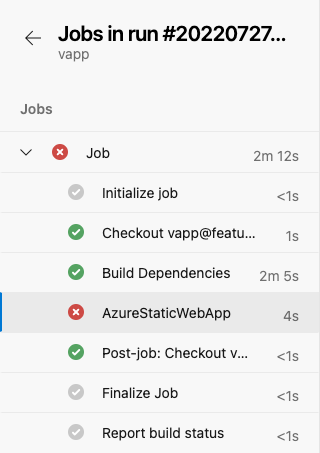
### The folder to deploy

**Device info (if applicable):**
Hardware Overview:
Model Name: Mac mini
Model Identifier: Macmini8,1
Processor Name: 6-Core Intel Core i5
Processor Speed: 3 GHz
Number of Processors: 1
Total Number of Cores: 6
L2 Cache (per Core): 256 KB
L3 Cache: 9 MB
Memory: 32 GB
System Firmware Version: 1715.81.2.0.0 (iBridge: 19.16.10744.0.0,0)
System Version: macOS 12.2 (21D49)
Kernel Version: Darwin 21.3.0
Boot Volume: Macintosh HD
Boot Mode: Normal
Computer Name: MacMini
Secure Virtual Memory: Enabled
System Integrity Protection: Enabled
Contributor guide
No contributing guide indexed for this repository
Assessment
This issue has not been assessed yet.