Default "cache-control: must-revalidate, max-age=30" leads to high bandwidth usage
- Dominant language
- No language data
- Stars
- 346
- Forks
- 67
- PR merge metrics
- No merged PRs in 30d
Description
**Describe the bug**
[Moved from SWA CLI Repository as asked]
I'm writing this to explain the current scenario we're facing at my company, I've searched a lot before and I opened a support ticket (still active) on Azure before coming here.
We've decided to move our Angular application from Azure App Service to Static Web App to reduce the costs of hosting. The application was already hosted for a long time with App Service before we moved to Static Web App.
Once we deployed to PROD we've been experiencing a huge bandwidth usage on our application, which makes sense for the first days due to the address changing from the App Service one to the Static Web App. We noted after a few days that the bandwidth usage has not been decreasing since we deployed so this made us look for what could be happening, this is what I found so far.
The **swa cli** has the `cache-control: must-revalidate, max-age=30` as a default value to all response that goes to the client, as we can see below in the picture. This took me a while to find since there's absolutely nothing about into the documentation, at least the ones I could find.

This default value leads to different behavior of how the client will calculate the cache lifetime for the file requested when compared with App Service that sends instead of the `cache-control` the` last-modified` header. What I could understand is that the header sent by App Service will generate a longer expiration time in the end because is not setting a proper time value with the `cache-control`. You can see below the same response for the file I showed before in Static Web App but now for App Service, also a statement of how it's calculated the lifetime for the cache.
_The freshness lifetime is calculated based on several headers. If a "Cache-control: max-age=N" header is specified, then the freshness lifetime is equal to N. If this header is not present, which is very often the case, it is checked if an Expires header is present. If an Expires header exists, then its value minus the value of the Date header determines the freshness lifetime. Finally, if neither header is present, look for a Last-Modified header. If this header is present, then the cache's freshness lifetime is equal to the value of the Date header minus the value of the Last-modified header divided by 10._
_Source: https://developer.mozilla.org/en-US/docs/Web/HTTP/Caching#Freshness_

I believe the cache-control default value was an intentioned feature made by the team but this leads to high bandwidth usage without decreasing after the users access the application once and return. Also, the leak of information about this is absolutely not good since this impacts directly on how much we pay.
I think this needs to be reviewed to behavior like the App Service when sending the Last-modified header, please let me know your thoughts.
I've applied the fix below to increase the size for the max-age to all files in our Angular application. unfortunately, I still don't know if the traffic will go down to the same values when was deployed with App Service. I have an Azure support ticket opened as I mentioned but if someone here can confirm that the fix will work it will be very good.
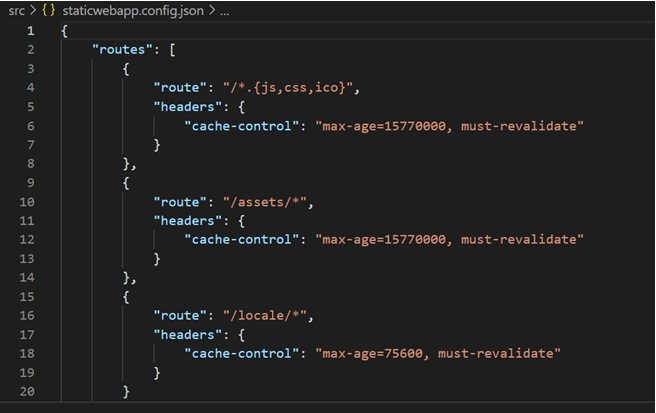
**To Reproduce**
Steps to reproduce the behavior:
1. Create a static web app without any headers definition for routes into the `staticwebapp.config.json` file.
**Desktop (please complete the following information):**
- OS: Windows 10
- Browser Chorme
- Version 96.0.4664.45
Contributor guide
No contributing guide indexed for this repository
Research direction
Start by reproducing the response headers for a static web app with no route headers in staticwebapp.config.json, then compare the default cache behavior described in the issue with the App Service response. Done means the default caching behavior is reviewed and either corrected or clearly documented, with the bandwidth impact verified.
Written by the indexing model from the issue text.
Assessment
- Tech stack
- angular, azure
- Domain
- cloud, web-dev
- Issue type
- Bug
- Difficulty
- 4/5
- Estimated time
- 3-5 days
- Activity status
- Stale
- Clarity
- Needs clarification
- Newbie friendliness
- 25/100