[Visual Studio 2022] Using deployproj does not allow to choose bicep template for deployment
- Dominant language
- Bicep
- Stars
- 3.6k
- Forks
- 830
- Avg merge
- 1d 21m
- Merged PRs (30d)
- 79
Description
**Bicep version**
v0.13.1
**Describe the bug**
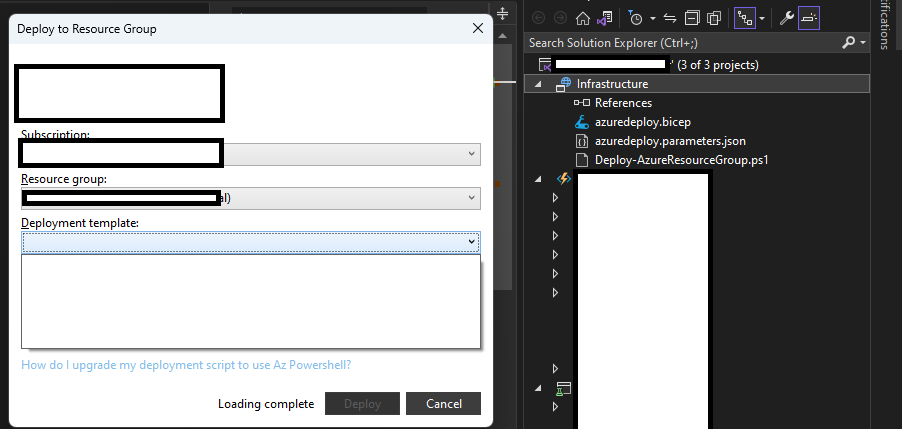
I tried to use Resource Group Deployment project to build infrastructure in VS2022 alongside app code. However when I tried to do a deployment from GUI it does not allow me to choose bicep template. I've renamed azuredeploy.json to azuredeploy.bicep but it seems it has validation on json file.
It would be good to have an end2end support for bicep-based deployments in Visual Studio.
**To Reproduce**
1. Add `Azure Resource Group` project into solution
2. Change `azuredeploy.json` to `azuredeploy.bicep` (and remove the ARM code)
3. Right click and try to deploy the file
4. Template dropdown is empty.
**Additional context**
Add any other context about the problem here.
cc: @davidcho23 @bhsubra as you have been working on VS Extension AFAIR.
Contributor guide
Research direction
Start with the Azure Resource Group project deployment GUI and the template-selection flow described in the reproduction steps. Compare how azuredeploy.json and azuredeploy.bicep are discovered and validated; done means a Bicep template appears in the Visual Studio deployment template dropdown and can be selected.
Written by the indexing model from the issue text.
Assessment
- Tech stack
- azure
- Domain
- cloud, devops
- Issue type
- Bug
- Difficulty
- 4/5
- Estimated time
- 3-5 days
- Activity status
- Stale
- Clarity
- Mostly clear
- Newbie friendliness
- 35/100