Alert Rules + Autocomplete produces invalid syntax
- Dominant language
- Bicep
- Stars
- 3.6k
- Forks
- 830
- Avg merge
- 1d 21m
- Merged PRs (30d)
- 79
Description
**Bicep version**
run `bicep --version` via the Bicep CLI, `az bicep version` via the AZ CLI or via VS code by navigating to the extensions tab and searching for Bicep
**Describe the bug**
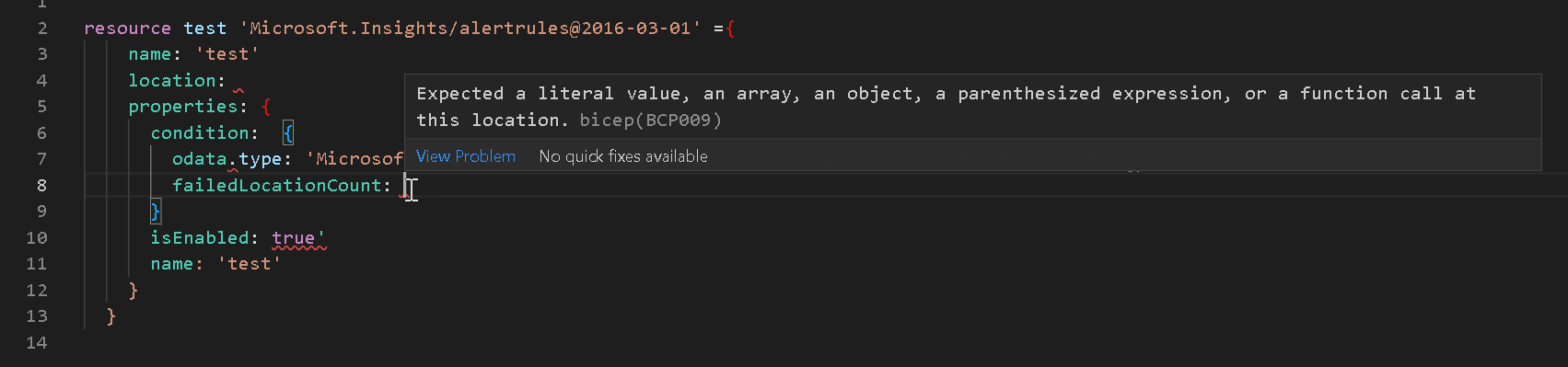
When setting up a `alertRules` through VSCode you are prompted with these three options, all which produce an invalid syntax with `odata.context`.

**To Reproduce**
Steps to reproduce the behavior:
Start with the following code:
```bicep
resource test 'Microsoft.Insights/alertrules@2016-03-01' ={
name: 'test'
location: 'eastus'
properties: {
condition: // put text cursor here and try to auto complete
isEnabled: true
name: 'test'
}
}
```
It should produce:
```bicep
resource test 'Microsoft.Insights/alertrules@2016-03-01' ={
name: 'test'
location: 'eastus'
properties: {
condition: {
odata.type: 'Microsoft.Azure.Management.Insights.Models.LocationThresholdRuleCondition' // ERR - Property has a dot
failedLocationCount:
}
isEnabled: true
name: 'test'
}
}
```
Contributor guide
Research direction
Start by reproducing the issue in VS Code with the provided Microsoft.Insights/alertrules resource and inspect the autocomplete suggestions for the condition property. Trace the resource schema or language-service entry point that generates those snippets; done means each suggestion produces valid Bicep syntax without a dotted property name such as odata.type.
Written by the indexing model from the issue text.
Assessment
- Tech stack
- azure
- Domain
- tooling
- Issue type
- Bug
- Difficulty
- 3/5
- Estimated time
- 1-2 days
- Activity status
- Stale
- Clarity
- Mostly clear
- Newbie friendliness
- 38/100