[VS Code Extension] provides information about required properties and default values
- Dominant language
- Bicep
- Stars
- 3.6k
- Forks
- 830
- Avg merge
- 1d 21m
- Merged PRs (30d)
- 79
Description
**Is your feature request related to a problem? Please describe.**
When editing a Bicep template with VS Code, I have no information about what properties are required, and what is the default value of property to see which ones could be omitted.
**Describe the solution you'd like**
When a property is hovered, for example like this:
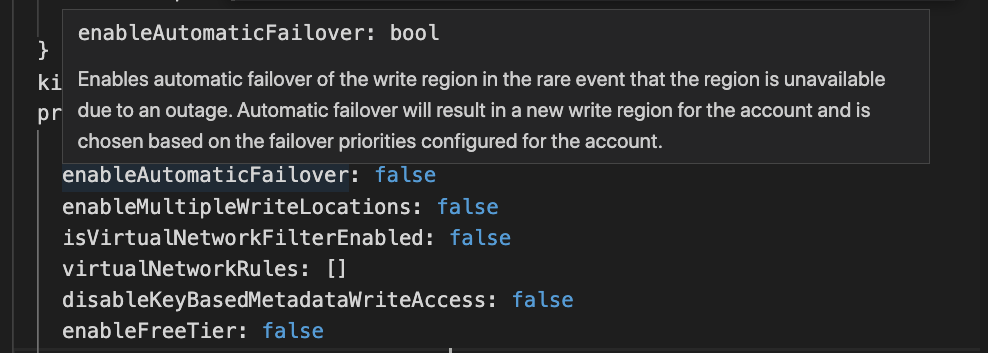
the information from the [azure templates docs](https://docs.microsoft.com/en-us/azure/templates/microsoft.documentdb/databaseaccounts?tabs=bicep) is displayed.
It would be very useful to also have here the information about whether the property is required and what is its default value.
Contributor guide
Research direction
Start with the Bicep VS Code extension's existing property-hover behavior and compare its output with the linked Azure templates documentation. Trace where hover information is assembled and determine how required-property and default-value metadata is represented. Done means hovering a property shows those details when the documentation provides them.
Written by the indexing model from the issue text.
Assessment
- Tech stack
- azure, vscode
- Domain
- developer-experience, devtools
- Issue type
- Feature
- Difficulty
- 4/5
- Estimated time
- 3-5 days
- Activity status
- Stale
- Clarity
- Mostly clear
- Newbie friendliness
- 38/100