VSCode extension: Intellisense is not recognizing required parameters for `Microsoft.ContainerService/managedClusters@2021-05-01`
- Dominant language
- Bicep
- Stars
- 3.6k
- Forks
- 830
- Avg merge
- 1d 21m
- Merged PRs (30d)
- 79
Description
**Bicep version**
Bicep CLI version 0.4.451 (e14a1f9511)
**Describe the bug**
I expect the VSCode Intellisense to tell me what are the required parameters for the resource during creation, however this is not the case.
Notice how the Intellisense is not detecting that I am missing a required parameter `servicePrincipalProfile` and `agentPoolProfiles`
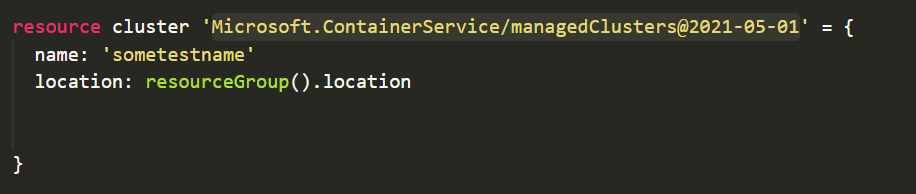
This is confirmed when I attempt to deploy the resource, see error message below:
```bash
{"error":{"code":"InvalidTemplateDeployment","message":"The template deployment 'cluster' is not valid according to the validation procedure. The tracking id is 'a40642cf-6485-4083-8586-6ae4dc3ba0df'. See inner errors for details.","details":[{"code":"InvalidParameter","message":"Provisioning of resource(s) for container service sometestname in resource group asilverm-bicep failed. Message: {\n \"code\": \"InvalidParameter\",\n \"message\": \"Required parameter servicePrincipalProfile is missing (null).\",\n \"target\": \"servicePrincipalProfile\"\n }. Details: "}]}}
```
**To Reproduce**
Steps to reproduce the behavior:
1) Create a valid bicep file containing the resource below
```bicep
resource cluster 'Microsoft.ContainerService/managedClusters@2021-05-01' = {
name: 'sometestname'
location: resourceGroup().location
}
```
Attempt to deploy the file using the az command
` az deployment group create -f ./test.bicep -g somegroup`
**Additional context**
Add any other context about the problem here.
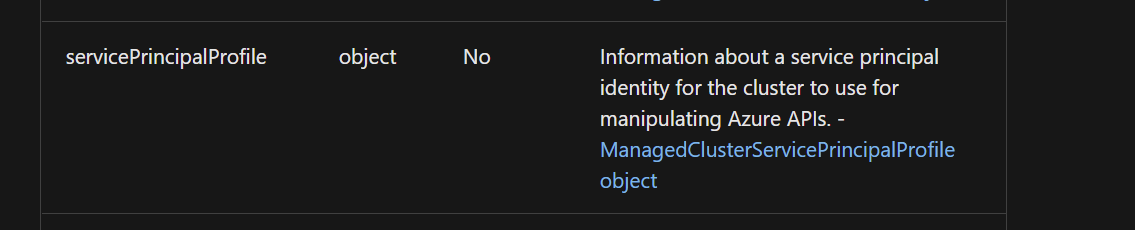
Notice how the [documentation ](https://docs.microsoft.com/en-us/azure/templates/microsoft.containerservice/2021-05-01/managedclusters?tabs=bicep#managedclusterproperties-object) says that this value is not required but it is
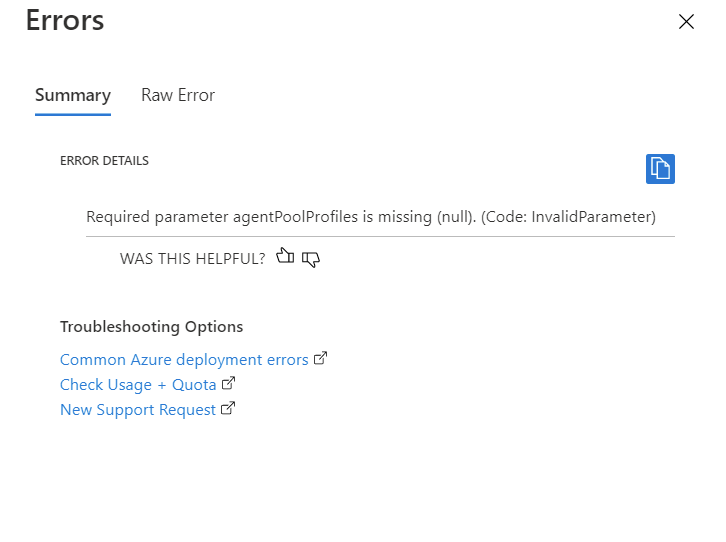
If you do end-up specifying the `servicePrincipalProfile`, then you encounter an error with `agentPoolProfiles`
Contributor guide
Research direction
Start by reproducing the issue in the VSCode extension with the shown managedClusters resource and the az deployment command. Trace how the 2021-05-01 resource schema marks servicePrincipalProfile and agentPoolProfiles, then verify that IntelliSense identifies both as required and that the corrected declaration matches deployment validation.
Written by the indexing model from the issue text.
Assessment
- Tech stack
- azure, vscode
- Domain
- cloud, developer-experience, tooling
- Issue type
- Bug
- Difficulty
- 3/5
- Estimated time
- 1-2 days
- Activity status
- Stale
- Clarity
- Mostly clear
- Newbie friendliness
- 35/100