JS chat example fail on client connection: HTTP Authentication failed
- Dominant language
- TypeScript
- Stars
- 147
- Forks
- 96
- Avg merge
- 19h 28m
- Merged PRs (30d)
- 87
Description
I'm testing the service using the chat example and it doesn't work for me.
Following the documentation or downloading the JavaScript chat example from https://github.com/Azure/azure-webpubsub/tree/main/samples/javascript/chatapp, always find an "HTTP Authentication failed; no valid credentials available" when the client try to open a websocket connection with the token url.

WIth the Live Trace Tool, I found the following message that doesn't help so much
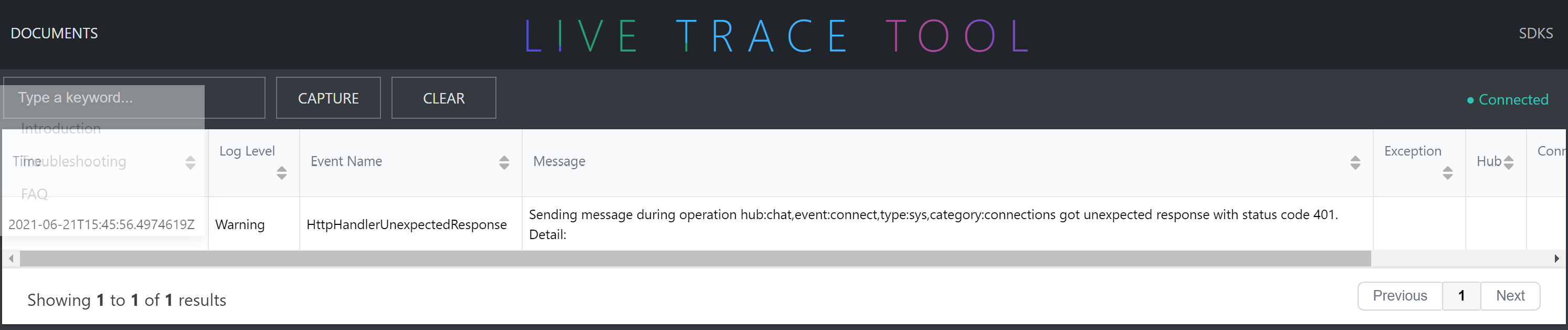
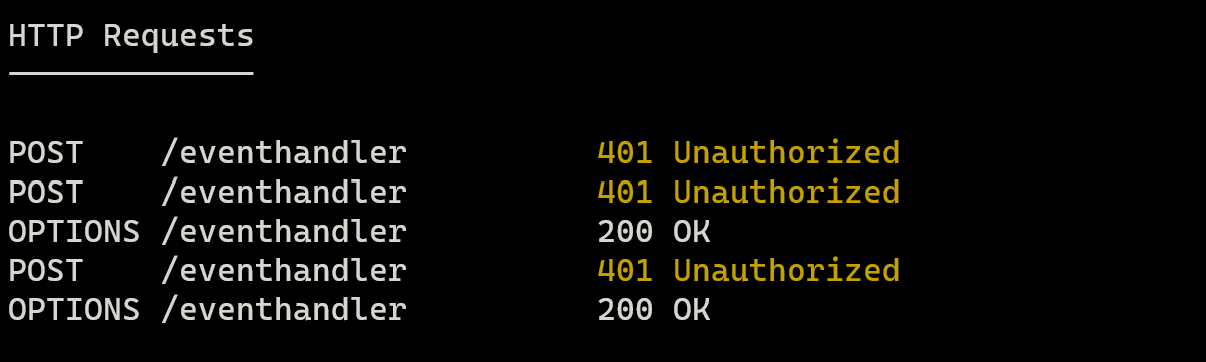
And the ngrok always has a 401 error on eventhandler
I also checked the token at jwt.ms and It's seemed good

any help?
Contributor guide
No contributing guide indexed for this repository
Research direction
Start with the documentation and samples/javascript/chatapp, then reproduce the WebSocket connection using the token URL. Compare the client error with the Live Trace Tool output and the ngrok 401 response; the issue is complete when the authentication failure is explained and the chat example connects successfully.
Written by the indexing model from the issue text.
Assessment
- Tech stack
- azure, javascript
- Domain
- backend
- Issue type
- Bug
- Difficulty
- 4/5
- Estimated time
- 3-5 days
- Activity status
- Stale
- Clarity
- Needs clarification
- Newbie friendliness
- 25/100