Azure / Azure/azure-rest-api-specs
Cannot Install/Delete Web App Site Extension utilizing Azure SDK for Python
- Dominant language
- TypeSpec
- Stars
- 3.1k
- Forks
- 5.9k
- Avg merge
- 3d 2h
- Merged PRs (30d)
- 424
Description
- **Package Name**: azure-mgmt-web
- **Package Version**: 7.0.0
- **Operating System**: Windows
- **Python Version**: 3.10.0
**Describe the bug**
When creating a webclient through the WebSiteManagementClient() and utlizing to invoke web_apps.begin_install_site_extension({required params}) it always returns 400 "Bad Request"
I've tried with many different Site extensions on a few separate app services - the request is making it to the endpoint but there is no message in the payload indicating what this issue is within the request nor does the Request URL look malformed in any way when debug logging.
Request URL: https://management.azure.com/subscriptions/{Masked}/resourceGroups/{Masked}/providers/Microsoft.Web/sites/{Masked}/siteextensions/AppDynamics.WindowsAzure.SiteExtension.4.5.Release?api-version=REDACTED
(Masked Sensitive values within the Request URL above.)
**To Reproduce**
Steps to reproduce the behavior:
1. install SDK Package
2. find an Azure Webapp to do a fresh install of a SiteExtension against.
3. create Webclient from SDK package utilizing WebSiteManagementClient()
webclient = WebSiteManagementClient(credential=credential, subscription_id=subscription_id, api_version=apiVersion)
4. invoke installation of Site Extension to targeted WebApp :
install_site_ext = webclient.web_apps.begin_install_site_extension(resource_group_name=resourceGroupName, name=siteName, site_extension_id=site_ext_id)
**Expected behavior**
Site Extension gets installed successfully and reports back the status within the response.
**Screenshots**
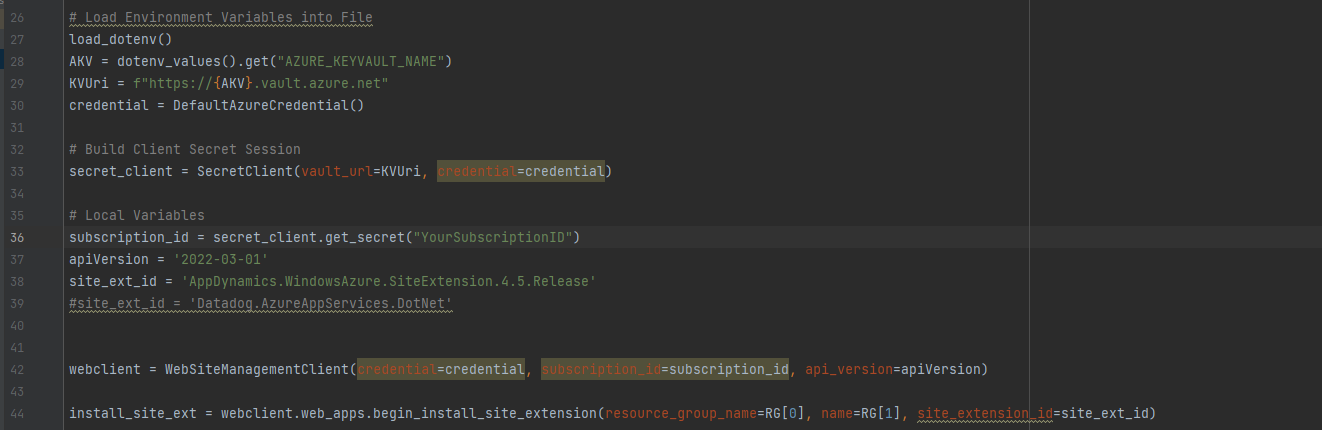

**Additional context**
The begin_install_site_extension just doesnt work - I can see the log App Service side but fails to install the extension completely with no additional data as to why. - [exception posted in screenshot]
when issuing a delete_site_extension it does remove the extension from the Service but still returns a bad request in the response - only way to know it was removed is manually checking the service or targeting the service with the SDK to check for the Extension there after.
Contributor guide
Research direction
Start by reproducing the failure through WebSiteManagementClient.web_apps.begin_install_site_extension and compare it with delete_site_extension, using the request URL and App Service logs described in the issue. Trace the corresponding Azure Web Apps REST operation and determine why successful install or delete operations return 400; done means the operation reports the correct result and the failure has a clear explanation or fix.
Written by the indexing model from the issue text.
Assessment
- Tech stack
- azure, python
- Domain
- api, cloud
- Issue type
- Bug
- Difficulty
- 4/5
- Estimated time
- 3-5 days
- Activity status
- Stale
- Clarity
- Mostly clear
- Newbie friendliness
- 35/100