Azure / Azure/azure-quickstart-templates
monitoring solution for Azure Backup not working
- Dominant language
- Bicep
- Stars
- 14.9k
- Forks
- 16.2k
- Avg merge
- 6d 21h
- Merged PRs (30d)
- 6
Description
[OMS monitoring solution for Azure Backup](https://github.com/Azure/azure-quickstart-templates/tree/master/101-backup-oms-monitoring)
### Issue Details
I install the template to my Azure account directly from github link. It completes without errors but i still cannot find the backup view. The solution exists. Cant find the view. When i click the solution and trying to view something i get the error 400 (picture attached)
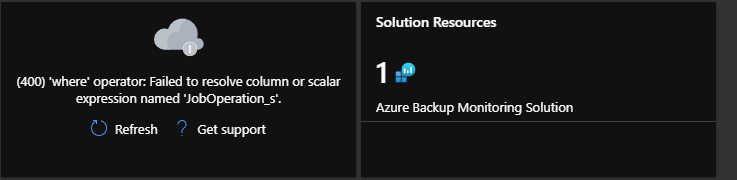
### Repro steps (*if necessary, delete otherwise*)
1. I click Deploy to Azure
2. I put my resource group region and Log Analytics Workspace
3. Template Installation finishes without errors
4. Overview for Azure Backup is not there.
5.
Contributor guide
No contributing guide indexed for this repository
Research direction
Start with the 101-backup-oms-monitoring template linked in the issue and reproduce the deployment using the listed steps. Inspect why the Azure Backup overview is missing and why opening the solution returns HTTP 400; done means the deployment exposes the backup view without that error.
Written by the indexing model from the issue text.
Assessment
- Tech stack
- azure
- Domain
- cloud, observability
- Issue type
- Bug
- Difficulty
- 4/5
- Estimated time
- 3-5 days
- Activity status
- Stale
- Clarity
- Mostly clear
- Newbie friendliness
- 35/100